
النقل الأساسي
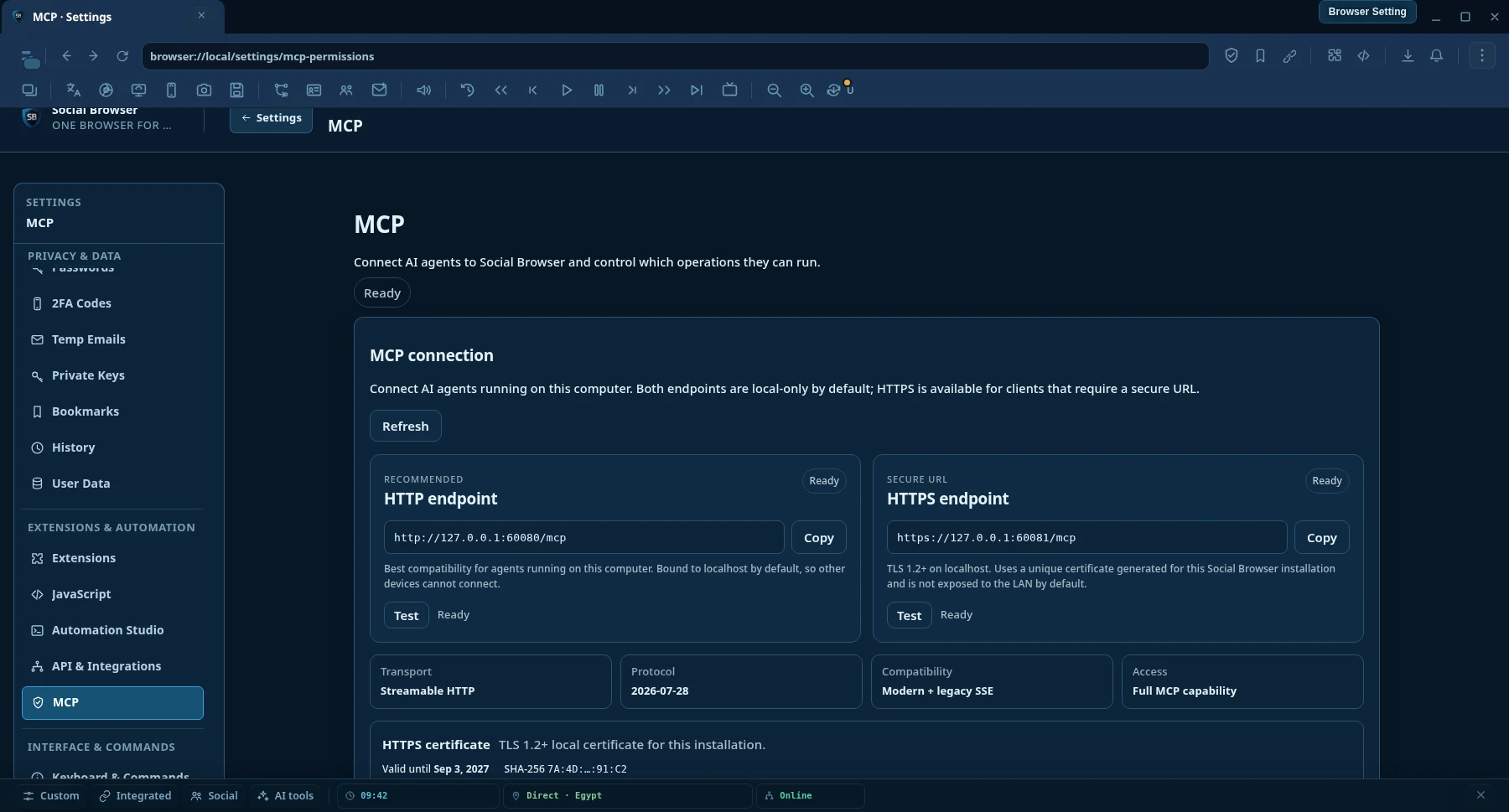
موصى بهرابط HTTP
أفضل توافق محلي لعملاء MCP AI الذين يعملون على نفس جهاز Social Browser.
http://127.0.0.1:60080/mcp- Streamable HTTP
- محلي فقط افتراضيًا
- لا يحتاج إعداد شهادة
بروتوكول سياق النموذج · MCP AI
اربط أي نظام ذكاء اصطناعي متوافق مع MCP AI بجلسة دائمة في Social Browser. ابحث واقرأ الويب، وتحكم في بروفايلات مسجّلة الدخول فعليًا، ونفّذ الأتمتة، وأدر البروكسيات وشغّل المهام الطويلة من نقطة اتصال واحدة.
شوف المنتج
حدد ما يمكن للذكاء الاصطناعي قراءته وأتمتته والتحكم فيه من خلال صلاحيات MCP.
اتصال MCP AI
كلا الرابطين محليان فقط افتراضيًا. استخدم HTTP لأعلى توافق مع العملاء المحليين، أو HTTPS عندما يتطلب عميل الذكاء الاصطناعي رابطًا آمنًا ومشفرًا.
أفضل توافق محلي لعملاء MCP AI الذين يعملون على نفس جهاز Social Browser.
http://127.0.0.1:60080/mcpنقل MCP AI محلي مشفر للعملاء وبيئات التشغيل التي تتطلب رابط HTTPS.
https://127.0.0.1:60081/mcpشهادة HTTPS
ينشئ Social Browser شهادة محلية ذاتية التوقيع وفريدة لكل تثبيت. افتح Settings → MCP AI Permissions ثم استخدم Download certificate (.crt) أو Copy PEM. إذا كان عميل الذكاء الاصطناعي يطبق تحقق TLS صارمًا، استورد الشهادة العامة إلى مخزن الثقة الخاص ببيئة تشغيل العميل.
لماذا Social Browser MCP AI
غالبًا ما تكشف عمليات التكامل العادية للتحكم في المتصفح عن إجراءات منخفضة المستوى وتترك الذكاء الاصطناعي لتجميع كل شيء بنفسه. يضيف Social Browser MCP AI الاكتشاف والبحث والأتمتة والتحقق على مستوى أعلى بالإضافة إلى المتصفح المستمر الحقيقي بروفايلات.
يمكن أن يعمل الذكاء الاصطناعي داخل البروفايلات الدائمة مع حالة المتصفح التي يستخدمها المستخدم بالفعل، بما في ذلك ملفات تعريف الارتباط والتخزين المحلي والإعدادات وسياق البروكسي الذي يوفره المستخدم.
تعد محركات البحث وقراءة URL النظيفة ولقطات الصفحة الدلالية والبحث داخل الصفحة والاستخراج المنظم والبحث المتزامن متعدد الصفحات من عمليات MCP AI من الدرجة الأولى.
Workflows، تساعد المهام والانتظار والتحقق والأدلة وإيصالات الاسترداد والتنفيذ الوكلاء على التحقق مما حدث بالفعل بدلاً من الثقة في رسالة نخب.
يمكن أن تسمح إعدادات التشغيل MCP AI بالإجراءات تلقائيًا أو السؤال عنها أولاً أو حظرها. يؤدي هذا إلى إبقاء المهام غير المراقبة عملية مع ترك السياسة النهائية لمالك الجهاز.
القدرات
يمكن اكتشاف الكتالوج بواسطة الذكاء الاصطناعي، لذلك لا يحتاج العملاء إلى حفظ اسم كل عملية قبل أن يتمكنوا من العمل.
search.web بحث الويب المنظمweb.read قراءة نظيفة URLweb.snapshot, web.find and web.extractweb.readMany and searchAndReadbrowser.tabs.screenshot لمحتوى التبويب المُدارbrowser.desktop.sources.list للشاشات ونوافذ التطبيقاتbrowser.desktop.screenshot للشاشة أو النافذة المحددةحقيقة القدرات
يفصل Social Browser بين اكتشاف الأدوات وحقيقة تنفيذها. يستطيع الوكيل التحقق مما إذا كانت العملية مسجلة ومنفذة وقابلة للتنفيذ وفق السياسة الحالية أو محظورة أو تنتظر موافقة أو معروضة فقط كعقد ثابت.
browser.agent.capability.truth browser.agent.capability.check browser.agent.runtime.verify browser.agent.unattended.check هل العملية متاحة عبر MCP AI؟
هل يوجد منفذ فعلي لهذه العملية في هذا الإصدار؟
هل هي مسموحة الآن أم تحتاج موافقة أم محظورة؟
هل يمكن لبيئة التشغيل فحص جاهزيته مسبقًا دون الادعاء بحدوث نتيجة خارجية؟
يمنع ذلك اعتبار وجود مخطط أو نجاح التفويض دليلًا على أن إجراءً على الجهاز تم تنفيذه فعليًا.
قارئ ويب بمستويين
web.read يبدأ بقارئ HTTP سريع ومباشر للصفحات العامة العادية. عندما يكون عرض JavaScript أو ملفات تعريف الارتباط أو حالة المصادقة أو بروكسي بروفايل أو السياق الجغرافي أو حالة متصفح أخرى مطلوبًا، يمكن لـ Social Browser قراءة الصفحة من خلال بروفايل الحقيقي المستمر.
searchAndRead({ query: "browser automation MCP", maxResults: 5, read: { mode: "auto", profileId: "my-profile" } }) بحث ← اختر النتيجة URLs ← قراءة الصفحات بشكل متزامن ← إرجاع المحتوى المنظم إلى الذكاء الاصطناعي.
إعداد سريع
يوفر Social Browser روابط MCP AI محلية عبر Streamable HTTP وHTTPS. يوصى بـ HTTP افتراضيًا لأعلى توافق؛ ويتوفر HTTPS عندما يتطلب العميل رابطًا آمنًا.
أبقِ Social Browser مفتوحًا على الكمبيوتر الذي يمتلك بروفايلات وحالة المتصفح التي تريد أن يستخدمها الذكاء الاصطناعي.
استخدم HTTP لأبسط إعداد محلي، أو HTTPS عندما يتطلب العميل TLS. كلاهما يعرض نفس أدوات MCP AI.
http://127.0.0.1:60080/mcphttps://127.0.0.1:60081/mcpأعد الاتصال بعد تحديثات MCP AI حتى يقوم العميل بإعادة تحميل كتالوج الأداة، ثم قم بوصف المهمة باللغة العادية. يستطيع Agent Discovery العثور على الأدوات والمخططات المناسبة تلقائيًا.
أضف هذا إلى %USERPROFILE%\.codex\config.toml، ثم أعد تشغيل Codex.
[mcp_servers.social_browser] enabled = true url = "http://127.0.0.1:60080/mcp"
إذا كان Codex أو أي عميل آخر يتطلب HTTPS، استخدم https://127.0.0.1:60081/mcp وثق بالشهادة العامة من إعدادات MCP AI في Social Browser إذا كانت بيئة التشغيل تتحقق من الشهادات المحلية بشكل صارم.
اختر خادم HTTP MCP AI قابل للتدفق واستخدم نقطة النهاية نفسها. تختلف أسماء ملفات التكوين وواجهة المستخدم للعميل بين المنتجات.
http://127.0.0.1:60080/mcphttps://127.0.0.1:60081/mcpالاتصالات عن بُعد تتطلب ربط الخادم صراحةً وإعداد أمان الشبكة. لا يتم تفعيلها بمجرد تغيير IP في الرابط.
التدفق المقترح للوكيل
لا يحتاج الذكاء الاصطناعي إلى تخمين أسماء العمليات أو افتراض نجاح الإجراء.
browser.agent.guide واكتشاف القدرات.browser.agent.tools.search للعثور على أفضل عملية لتحقيق الهدف.browser.agent.tools.get قبل استدعاء أدوات غير مألوفة.سياسات عمليات MCP AI
يستخدم Social Browser سياسات مستوى التشغيل. عليك أن تقرر فئات العمليات التي يتم تشغيلها تلقائيًا، والتي تتطلب الموافقة وتلك المحظورة. وهذا يعني أن المهام الموثوقة المتكررة لا تحتاج إلى التوقف فقط لأن المستخدم لا يجلس على الكمبيوتر.
تنتمي السياسات إلى مستخدم Social Browser. لا يمكن لعميل الذكاء الاصطناعي إعادة كتابة سياسة الموافقة الخاصة به بصمت.
ماذا يمكنني أن أطلب منه؟
"افتح عميلي A بروفايل، وانتقل إلى لوحة المعلومات، وقم بتصدير التقرير الحالي وتأكد من انتهاء التنزيل."
"ابحث في الويب عن التغييرات في هؤلاء المنافسين الخمسة، واقرأ الصفحات الأكثر صلة، وقم بتلخيص ما تغير هذا الأسبوع فقط."
"اختبر كل بروكسي في القائمة بالتوازي، واحتفظ بالبروكسي السليم والبطيء، واحذف النتائج الفاشلة بشكل مجمّع."
"قم بإنشاء Workflow الذي يفتح هذه الصفحة، ويملأ النموذج، وينتظر النتيجة، ويستخرج معرف التأكيد ويتحقق من حفظه."
"ابحث عن كل تسويق يحمل علامة بروفايل، وافتح نفس URL في كل منها وقم بتشغيل سير العمل المعتمد هذا."
"قم بفحص علامة التبويب الحالية، وابحث عن زر الإرسال الصحيح حسب الدور أو التصنيف، وانقر عليه، ثم تحقق من تغيير حالة الصفحة."
«التقط صورة للتبويب الحالي، ثم التقط نافذة التطبيق إذا لزم الأمر، وافحص ما يظهر وأخبرني بما تغير.»
الأسئلة الشائعة
لا. تتوفر إجراءات الصفحة ذات المستوى المنخفض، ولكن MCP AI يعرض أيضًا بروفايلات والأتمتة والمهام وإدارة البروكسي والعمليات المجمعة وفهم الصفحة الدلالية والبحث على الويب وقراءة URL النظيفة والاستخراج والتحقق والاسترداد والتشخيص.
نعم. يمكن للعمليات المدعومة من بروفايل استخدام حالة Social Browser بروفايل المستمرة. يكون هذا مفيدًا عندما تعتمد الصفحة على ملفات تعريف الارتباط أو جلسة تمت المصادقة عليها أو عرض JavaScript أو إعدادات بروفايل أو سياق البروكسي الذي يوفره المستخدم.
نعم. تم تصميم سياسات MCP AI على مستوى التشغيل للمهام غير المراقبة. يمكنك اختيار ما يتم تشغيله تلقائيًا، وما يتم طرحه أولاً وما يتم حظره.
لا، Social Browser يتيح لك إضافة وإدارة البروكسيات الخاصين بك. يمكن أن يعمل Proxy Manager أيضًا مع مصادر قائمة البروكسي المجانية العامة القابلة للتحرير، ولكن يمكن أن تكون البروكسيات العامون غير مستقرين ويجب اختبارهم قبل الاستخدام.
توفر طبقة Agent Discovery دليلاً وكتالوج أدوات قابل للبحث ومخططات وحقيقة القدرة والتحقق من صحة الخطة حتى يتمكن الوكلاء المتوافقون من اكتشاف العمليات بدلاً من الاعتماد على قائمة مشفرة بشكل ثابت.
أعد تشغيل عميل MCP AI أو أعد توصيله إذا كان لا يزال يعرض كتالوج الأدوات القديم. تعريفات أداة التخزين المؤقت للعديد من العملاء طوال مدة الاتصال.
نعم. استخدم https://127.0.0.1:60081/mcp. ينشئ Social Browser شهادة محلية فريدة للتثبيت ويتيح تنزيل ملف .crt العام أو نسخ PEM من إعدادات MCP AI.
لا. يعرض HTTP وHTTPS نفس كتالوج عمليات MCP AI. يقوم HTTPS بتشفير النقل المحلي؛ ولا يفتح أدوات إضافية ولا يغير سياسات العمليات.
يستخدم رابط HTTPS الافتراضي شهادة محلية ذاتية التوقيع خاصة بكل تثبيت. قد تحتاج العملاء ذات التحقق الصارم من الشهادات إلى استيراد هذه الشهادة العامة في مخزن الثقة الخاص ببيئة التشغيل. لا يتم تصدير المفتاح الخاص مطلقًا.
لا. الوصول عن بُعد معطل افتراضيًا ويتطلب ربط الخادم صراحةً مع تأمين الشبكة بشكل مناسب. شهادة HTTPS المحلية الافتراضية مخصصة لـ localhost وعناوين loopback.
لا. تميز Capability Truth بين الأدوات المسجلة والمنفذات الفعلية وحالة السياسة الحالية. يمكن للوكلاء فحص حقيقة القدرات وجاهزية بيئة التشغيل قبل الادعاء بأن العملية قابلة للتنفيذ.
تحكم في المتصفح للذكاء الاصطناعي
قم بتنزيل Social Browser، وقم بتوصيل عميل MCP AI الخاص بك ودع التشغيل الآلي الخاص بك يعمل بنفس حالة بروفايلات والمتصفح الذي تستخدمه بالفعل.
MCP reference
Use the capability catalog for tool domains and contract rules, then use the client setup guide to connect a compatible MCP client.
Capability truth, stable resource identity, executor truth, and runtime discovery.
Open MCP Tools →Connect Streamable HTTP clients to the local Social Browser MCP endpoint.
Open MCP Clients →