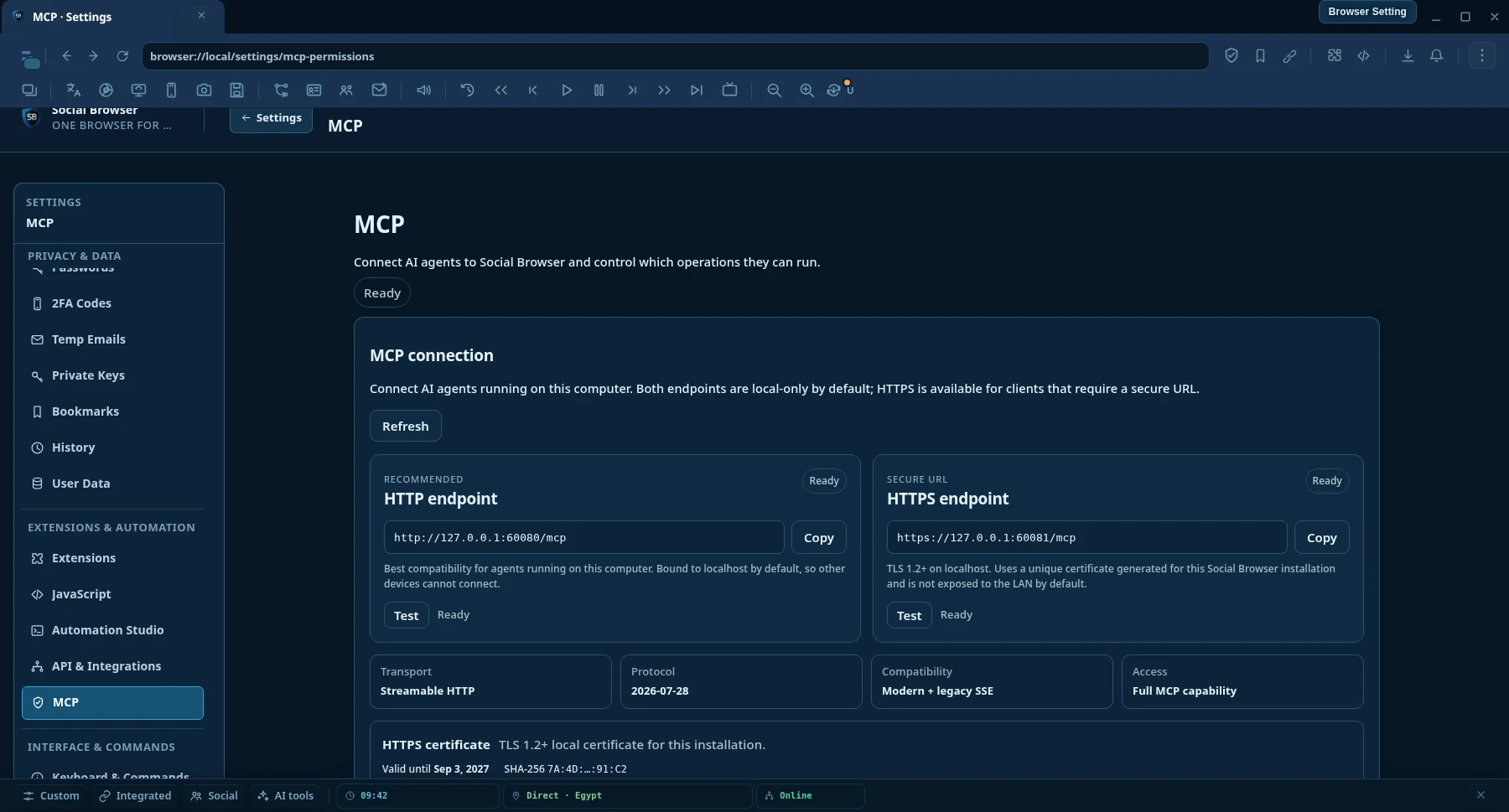
HTTP-Endpunkt
Beste lokale Kompatibilität für MCP AI-Clients, die auf demselben Computer wie Social Browser laufen.
http://127.0.0.1:60080/mcp- Streamable HTTP
- Standardmäßig nur lokal
- Keine Zertifikatseinrichtung erforderlich
Model Context Protocol · MCP AI
Connect any MCP AI-compatible clients to a persistent Social Browser session. Search and read the web, control real logged-in Profiles, automate browser work, manage proxies and run long tasks from one endpoint.

Produkt ansehen
Lege über MCP-Berechtigungen fest, was KI lesen, automatisieren und steuern darf.
MCP AI-Verbindung
Beide Endpunkte sind standardmäßig nur lokal erreichbar. Verwende HTTP für maximale lokale Client-Kompatibilität oder HTTPS, wenn dein KI-Client eine verschlüsselte sichere URL benötigt.
Beste lokale Kompatibilität für MCP AI-Clients, die auf demselben Computer wie Social Browser laufen.
http://127.0.0.1:60080/mcpVerschlüsselter lokaler MCP AI-Transport für Clients und Runtimes, die eine HTTPS-URL benötigen.
https://127.0.0.1:60081/mcpHTTPS-Zertifikat
Social Browser erzeugt pro Installation ein eindeutiges lokales selbstsigniertes Zertifikat. Öffne Settings → MCP AI Permissions und wähle Download certificate (.crt) oder Copy PEM. Bei strenger TLS-Prüfung importierst du das öffentliche Zertifikat in den Trust Store der Client-Runtime.
Why Social Browser MCP AI
Normal browser-control integrations often expose low-level actions and leave the AI to assemble everything itself. Social Browser MCP AI adds higher-level discovery, research, automation and verification on top of real persistent browser Profiles.
AI can work inside persistent Profiles with the browser state already used by the user, including cookies, local storage, settings and user-supplied proxy context.
Search engines, clean URL reading, semantic page snapshots, in-page find, structured extraction and concurrent multi-page research are first-class MCP AI operations.
Workflows, tasks, waits, verification, evidence, recovery and execution receipts help agents check what actually happened instead of trusting a toast message.
MCP AI operation settings can allow actions automatically, ask first or block them. This keeps unattended tasks practical while leaving the final policy with the device owner.
Capabilities
The catalog is discoverable by the AI, so clients do not need to memorize every operation name before they can work.
search.web structured web searchweb.read clean URL readingweb.snapshot, web.find and web.extractweb.readMany and searchAndReadbrowser.tabs.screenshot für den Inhalt eines verwalteten Tabsbrowser.desktop.sources.list für Monitore und Anwendungsfensterbrowser.desktop.screenshot für einen Bildschirm oder ein ausgewähltes FensterCapability Truth
Social Browser trennt Tool-Erkennung von der tatsächlichen Implementierung. Ein Agent kann prüfen, ob eine Operation registriert, implementiert, nach aktueller Richtlinie ausführbar, blockiert, genehmigungspflichtig oder nur als stabiler Vertrag verfügbar ist.
browser.agent.capability.truth browser.agent.capability.check browser.agent.runtime.verify browser.agent.unattended.check Ist die Operation über MCP AI verfügbar?
Existiert in dieser Version ein echter Executor?
Ist sie jetzt erlaubt, genehmigungspflichtig oder blockiert?
Kann die Runtime dies vorab prüfen, ohne ein externes Ergebnis vorzutäuschen?
So wird verhindert, dass ein Schema oder ein Autorisierungsergebnis fälschlich als Beweis für eine tatsächlich ausgeführte Host-Aktion gilt.
Two-tier web reader
web.read starts with a fast direct HTTP reader for ordinary public pages. When JavaScript rendering, cookies, authenticated state, a Profile proxy, geographic context or other browser state is required, Social Browser can read the page through a real persistent Profile.
searchAndRead({ query: "browser automation MCP", maxResults: 5, read: { mode: "auto", profileId: "my-profile" } }) Search → choose result URLs → read pages concurrently → return structured content to the AI.
Quick setup
Social Browser stellt lokale MCP AI-Endpunkte über Streamable HTTP und HTTPS bereit. HTTP ist für maximale Kompatibilität die empfohlene Voreinstellung; HTTPS ist verfügbar, wenn der Client eine sichere URL benötigt.
Keep Social Browser open on the computer that owns the Profiles and browser state you want the AI to use.
Verwende HTTP für die einfachste lokale Einrichtung oder HTTPS, wenn der Client TLS benötigt. Beide stellen dieselben MCP AI-Tools bereit.
http://127.0.0.1:60080/mcphttps://127.0.0.1:60081/mcpReconnect after MCP AI updates so the client reloads the tool catalog, then describe the task in normal language. Agent Discovery can find the right tools and schemas automatically.
Add this to %USERPROFILE%\.codex\config.toml, then restart Codex.
[mcp_servers.social_browser] enabled = true url = "http://127.0.0.1:60080/mcp"
Wenn Codex oder ein anderer Client HTTPS benötigt, verwende https://127.0.0.1:60081/mcp und vertraue dem öffentlichen Zertifikat aus den Social-Browser-MCP AI-Einstellungen, falls die Runtime lokale Zertifikate streng prüft.
Choose a Streamable HTTP MCP AI server and use the same endpoint. Client UI and configuration file names differ between products.
http://127.0.0.1:60080/mcphttps://127.0.0.1:60081/mcpRemote-Verbindungen erfordern eine explizite Serverbindung und Netzwerksicherheitskonfiguration. Sie werden nicht allein durch Ändern der Endpunkt-IP aktiviert.
Recommended agent flow
The AI does not need to guess operation names or assume an action worked.
browser.agent.guide and capability discovery.browser.agent.tools.search to find the best operation for the goal.browser.agent.tools.get before calling unfamiliar tools.MCP AI operation policies
Social Browser uses operation-level policies. You decide which operation categories run automatically, which require approval and which are blocked. That means repetitive trusted tasks do not need to stop only because the user is not sitting at the computer.
Policies belong to the Social Browser user. An AI client cannot silently rewrite its own approval policy.
What can I ask it to do?
“Open my Client A Profile, go to the dashboard, export the current report and confirm the download finished.”
“Search the web for changes in these five competitors, read the most relevant pages and summarize only what changed this week.”
“Test every proxy in the list in parallel, keep the healthy and slow ones, and bulk-delete the failed results.”
“Create a Workflow that opens this page, fills the form, waits for the result, extracts the confirmation ID and verifies it was saved.”
“Find every Profile tagged Marketing, open the same URL in each one and run this approved workflow.”
“Inspect the current tab, find the correct submit button by role or label, click it, then verify the page state changed.”
„Erfasse den aktuellen Tab, danach bei Bedarf das Anwendungsfenster, prüfe das Sichtbare und sag mir, was sich geändert hat.“
FAQ
No. Low-level page actions are available, but MCP AI also exposes Profiles, automation, tasks, proxy management, bulk operations, semantic page understanding, web search, clean URL reading, extraction, verification, recovery and diagnostics.
Yes. Profile-backed operations can use persistent Social Browser Profile state. This is useful when a page depends on cookies, an authenticated session, JavaScript rendering, Profile settings or user-supplied proxy context.
Yes. Operation-level MCP AI policies are designed for unattended tasks. You choose what runs automatically, what asks first and what is blocked.
No. Social Browser lets you add and manage your own proxies. The Proxy Manager can also work with editable public free-proxy list sources, but public proxies can be unstable and should be tested before use.
The Agent Discovery layer provides a guide, searchable tool catalog, schemas, capability truth and plan validation so compatible agents can discover operations instead of relying on a hard-coded list.
Restart or reconnect the MCP AI client if it still shows an old tool catalog. Many clients cache tool definitions for the lifetime of the connection.
Ja. Verwende https://127.0.0.1:60081/mcp. Social Browser erstellt ein eindeutiges lokales Zertifikat für die Installation und ermöglicht den Download der öffentlichen .crt-Datei oder das Kopieren des PEM aus den MCP AI-Einstellungen.
Nein. HTTP und HTTPS stellen denselben MCP AI-Operationskatalog bereit. HTTPS verschlüsselt den lokalen Transport; es schaltet keine zusätzlichen Tools frei und ändert keine Richtlinien.
Der standardmäßige HTTPS-Endpunkt verwendet ein installationsspezifisches lokales selbstsigniertes Zertifikat. Clients mit strenger Zertifikatsprüfung müssen das öffentliche Zertifikat eventuell in den Trust Store ihrer Runtime importieren. Der private Schlüssel wird niemals exportiert.
Nein. Remote-Zugriff ist standardmäßig deaktiviert und erfordert eine explizite Serverbindung sowie geeignete Netzwerksicherheit. Das lokale Standard-HTTPS-Zertifikat ist für localhost und Loopback-Adressen gedacht.
Nein. Capability Truth unterscheidet registrierte Tools von implementierten Executoren und dem aktuellen Richtlinienstatus. Agents können Capability Truth und Runtime-Bereitschaft prüfen, bevor sie die Ausführbarkeit behaupten.

Browser control for AI
Download Social Browser, connect your MCP AI client and let your automation work with the same Profiles and browser state you already use.
MCP reference
Use the capability catalog for tool domains and contract rules, then use the client setup guide to connect a compatible MCP client.
Capability truth, stable resource identity, executor truth, and runtime discovery.
Open MCP Tools →Connect Streamable HTTP clients to the local Social Browser MCP endpoint.
Open MCP Clients →