
मुख्य ट्रांसपोर्ट
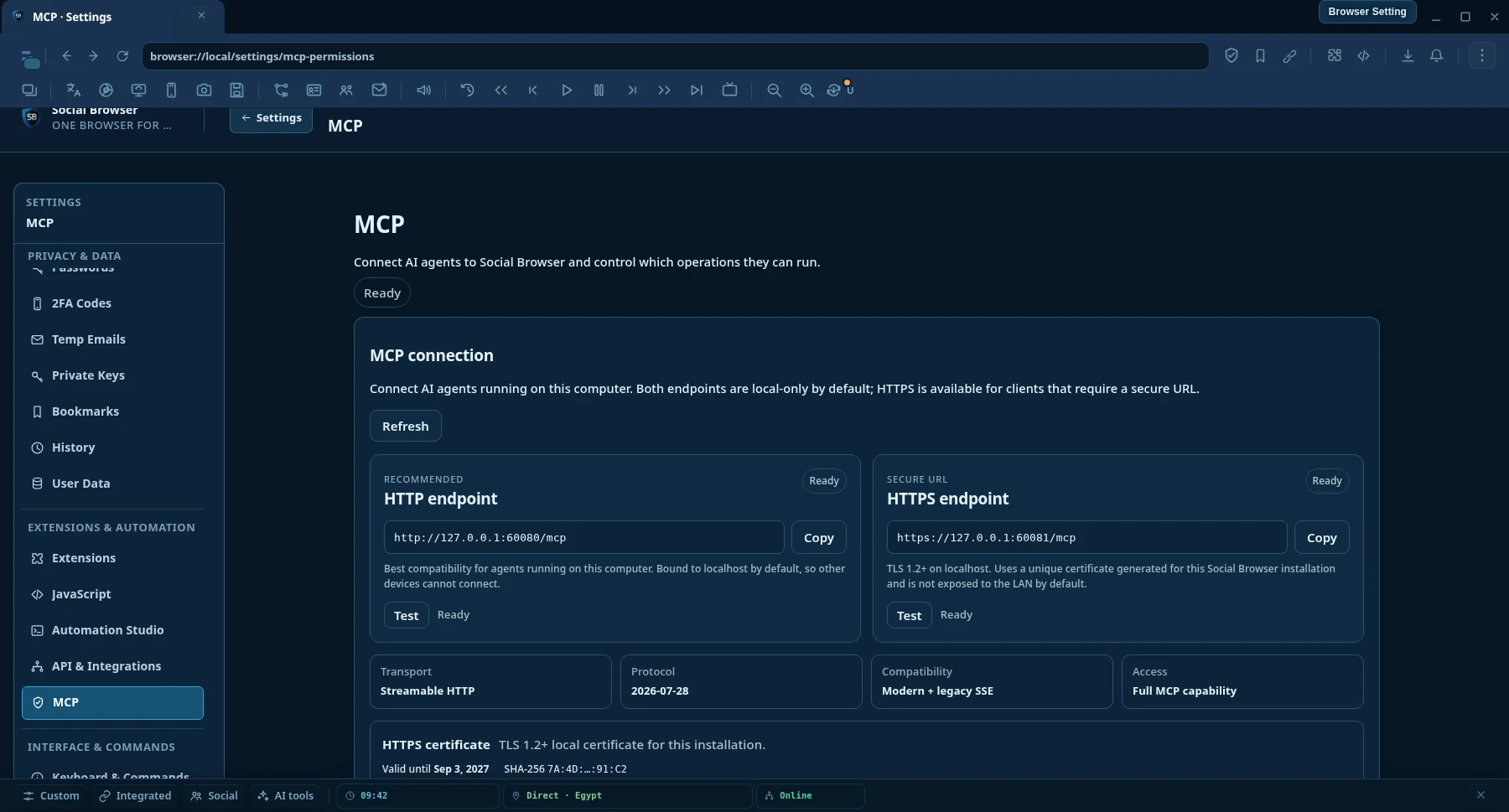
अनुशंसितHTTP एंडपॉइंट
Social Browser वाले उसी कंप्यूटर पर चलने वाले MCP AI क्लाइंट के लिए सर्वोत्तम स्थानीय संगतता।
http://127.0.0.1:60080/mcp- स्ट्रीम करने योग्य HTTP
- डिफ़ॉल्ट रूप से केवल स्थानीय
- सर्टिफिकेट सेटअप आवश्यक नहीं
मॉडल संदर्भ प्रोटोकॉल · MCP AI
किसी भी MCP AI-संगत क्लाइंट को लगातार Social Browser सत्र से कनेक्ट करें। वेब खोजें और पढ़ें, वास्तविक लॉग-इन Profiles को नियंत्रित करें, ब्राउज़र कार्य को स्वचालित करें, प्रॉक्सी प्रबंधित करें और एक एंडपॉइंट से लंबे कार्य चलाएं।
प्रोडक्ट देखें
MCP अनुमतियों से तय करें कि AI क्या पढ़, ऑटोमेट और नियंत्रित कर सकता है।
MCP AI कनेक्शन
दोनों एंडपॉइंट डिफ़ॉल्ट रूप से केवल स्थानीय हैं। अधिकतम स्थानीय क्लाइंट संगतता के लिए HTTP उपयोग करें, या जब AI क्लाइंट को एन्क्रिप्टेड सुरक्षित URL चाहिए तब HTTPS उपयोग करें।
Social Browser वाले उसी कंप्यूटर पर चलने वाले MCP AI क्लाइंट के लिए सर्वोत्तम स्थानीय संगतता।
http://127.0.0.1:60080/mcpउन क्लाइंट और रनटाइम के लिए एन्क्रिप्टेड स्थानीय MCP AI ट्रांसपोर्ट जिन्हें HTTPS URL चाहिए।
https://127.0.0.1:60081/mcpHTTPS सर्टिफिकेट
Social Browser हर इंस्टॉलेशन के लिए एक अद्वितीय स्थानीय self-signed सर्टिफिकेट बनाता है। Settings → MCP AI Permissions खोलें, फिर Download certificate (.crt) या Copy PEM उपयोग करें। यदि AI क्लाइंट सख्त TLS validation करता है, तो उस सार्वजनिक सर्टिफिकेट को क्लाइंट रनटाइम के trust store में import करें।
क्यों Social Browser MCP AI
सामान्य ब्राउज़र-नियंत्रण एकीकरण अक्सर निम्न-स्तरीय कार्रवाइयों को उजागर करते हैं और एआई को स्वयं ही सब कुछ इकट्ठा करने के लिए छोड़ देते हैं। Social Browser MCP AI वास्तविक स्थायी ब्राउज़र Profiles के शीर्ष पर उच्च स्तरीय खोज, अनुसंधान, स्वचालन और सत्यापन जोड़ता है।
AI उपयोगकर्ता द्वारा पहले से ही उपयोग की गई ब्राउज़र स्थिति के साथ लगातार Profiles के अंदर काम कर सकता है, जिसमें कुकीज़, स्थानीय भंडारण, सेटिंग्स और उपयोगकर्ता द्वारा प्रदत्त प्रॉक्सी संदर्भ शामिल हैं।
खोज इंजन, स्वच्छ URL रीडिंग, सिमेंटिक पेज स्नैपशॉट, इन-पेज खोज, संरचित निष्कर्षण और समवर्ती बहु-पृष्ठ अनुसंधान प्रथम श्रेणी MCP AI ऑपरेशन हैं।
Workflows, कार्य, प्रतीक्षा, सत्यापन, साक्ष्य, पुनर्प्राप्ति और निष्पादन रसीदें एजेंटों को टोस्ट संदेश पर भरोसा करने के बजाय यह जांचने में मदद करती हैं कि वास्तव में क्या हुआ था।
MCP AI ऑपरेशन सेटिंग्स स्वचालित रूप से कार्यों की अनुमति दे सकती हैं, पहले पूछें या उन्हें ब्लॉक करें। यह अंतिम नीति को डिवाइस मालिक पर छोड़ते समय अप्राप्य कार्यों को व्यावहारिक रखता है।
क्षमताएं
कैटलॉग एआई द्वारा खोजने योग्य है, इसलिए ग्राहकों को काम करने से पहले प्रत्येक ऑपरेशन नाम को याद रखने की आवश्यकता नहीं है।
search.web संरचित वेब खोजweb.read साफ़ URL पढ़नाweb.snapshot, web.find and web.extractweb.readMany and searchAndReadbrowser.tabs.screenshot managed tab content के लिएbrowser.desktop.sources.list मॉनिटर और ऐप विंडो के लिएbrowser.desktop.screenshot स्क्रीन या चुनी हुई विंडो के लिएक्षमता सत्य
Social Browser टूल खोज को वास्तविक implementation से अलग रखता है। एजेंट जाँच सकता है कि ऑपरेशन registered, implemented, मौजूदा नीति में executable, blocked, approval की प्रतीक्षा में, या केवल stable contract के रूप में उपलब्ध है।
browser.agent.capability.truth browser.agent.capability.check browser.agent.runtime.verify browser.agent.unattended.check क्या ऑपरेशन MCP AI के लिए उपलब्ध है?
क्या इस संस्करण में वास्तविक executor मौजूद है?
क्या यह अभी अनुमत है, अनुमोदन चाहिए या ब्लॉक है?
क्या रनटाइम किसी बाहरी परिणाम के घटित होने का दावा किए बिना इसे पहले जाँच सकता है?
यह schema या authorization result को वास्तविक host action के निष्पादन का प्रमाण मानने से रोकता है।
दो स्तरीय वेब रीडर
web.read सामान्य सार्वजनिक पृष्ठों के लिए तेज़ प्रत्यक्ष HTTP रीडर से प्रारंभ होता है। जब JavaScript रेंडरिंग, कुकीज़, प्रमाणित स्थिति, एक Profile प्रॉक्सी, भौगोलिक संदर्भ या अन्य ब्राउज़र स्थिति की आवश्यकता होती है, तो Social Browser एक वास्तविक लगातार Profile के माध्यम से पेज को पढ़ सकता है।
searchAndRead({ query: "browser automation MCP", maxResults: 5, read: { mode: "auto", profileId: "my-profile" } }) खोजें → परिणाम चुनें URLs → पृष्ठों को एक साथ पढ़ें → एआई पर संरचित सामग्री लौटाएं।
त्वरित सेटअप
Social Browser स्थानीय Streamable HTTP और HTTPS MCP AI endpoints देता है। अधिकतम संगतता के लिए HTTP सुझाया गया डिफ़ॉल्ट है; सुरक्षित URL की आवश्यकता होने पर HTTPS उपलब्ध है।
उस कंप्यूटर पर Social Browser को खुला रखें जिसके पास Profiles है और ब्राउज़र स्थिति है कि आप AI का उपयोग करना चाहते हैं।
सबसे सरल स्थानीय सेटअप के लिए HTTP उपयोग करें, या क्लाइंट को TLS चाहिए तो HTTPS। दोनों वही MCP AI टूल देते हैं।
http://127.0.0.1:60080/mcphttps://127.0.0.1:60081/mcpMCP AI अपडेट के बाद पुनः कनेक्ट करें ताकि क्लाइंट टूल कैटलॉग को फिर से लोड कर सके, फिर सामान्य भाषा में कार्य का वर्णन करें। एजेंट डिस्कवरी स्वचालित रूप से सही उपकरण और स्कीमा ढूंढ सकता है।
इसे इसमें जोड़ें %USERPROFILE%\.codex\config.toml, फिर कोडेक्स को पुनरारंभ करें।
[mcp_servers.social_browser] enabled = true url = "http://127.0.0.1:60080/mcp"
यदि Codex या कोई अन्य क्लाइंट HTTPS मांगता है, तो https://127.0.0.1:60081/mcp उपयोग करें और यदि रनटाइम स्थानीय सर्टिफिकेट की सख्त जाँच करता है तो Social Browser MCP AI Settings से सार्वजनिक सर्टिफिकेट पर भरोसा स्थापित करें।
एक स्ट्रीम करने योग्य HTTP MCP AI सर्वर चुनें और उसी एंडपॉइंट का उपयोग करें। क्लाइंट यूआई और कॉन्फ़िगरेशन फ़ाइल नाम उत्पादों के बीच भिन्न होते हैं।
http://127.0.0.1:60080/mcphttps://127.0.0.1:60081/mcpरिमोट कनेक्शन के लिए स्पष्ट server binding और नेटवर्क सुरक्षा कॉन्फ़िगरेशन आवश्यक है। केवल endpoint IP बदलने से वे सक्षम नहीं होते।
अनुशंसित एजेंट प्रवाह
एआई को ऑपरेशन के नामों का अनुमान लगाने या यह मानने की ज़रूरत नहीं है कि कोई कार्रवाई हुई है।
browser.agent.guide और क्षमता की खोज।browser.agent.tools.search लक्ष्य के लिए सर्वोत्तम संचालन ढूँढना।browser.agent.tools.get अपरिचित टूल को कॉल करने से पहले.MCP AI संचालन नीतियां
Social Browser ऑपरेशन-स्तरीय नीतियों का उपयोग करता है। आप तय करते हैं कि कौन सी ऑपरेशन श्रेणियां स्वचालित रूप से चलती हैं, किसे अनुमोदन की आवश्यकता होती है और कौन सी अवरुद्ध हैं। इसका मतलब है कि दोहराए जाने वाले विश्वसनीय कार्यों को केवल इसलिए रोकने की आवश्यकता नहीं है क्योंकि उपयोगकर्ता कंप्यूटर पर नहीं बैठा है।
नीतियाँ Social Browser उपयोगकर्ता की हैं। एक AI क्लाइंट चुपचाप अपनी स्वयं की अनुमोदन नीति को फिर से नहीं लिख सकता है।
मैं इसे क्या करने के लिए कह सकता हूँ?
"मेरा क्लाइंट A Profile खोलें, डैशबोर्ड पर जाएं, वर्तमान रिपोर्ट निर्यात करें और डाउनलोड समाप्त होने की पुष्टि करें।"
"इन पांच प्रतिस्पर्धियों में बदलावों के लिए वेब पर खोजें, सबसे प्रासंगिक पेज पढ़ें और केवल इस सप्ताह क्या बदलाव हुआ उसका सारांश दें।"
"सूची में प्रत्येक प्रॉक्सी का समानांतर परीक्षण करें, स्वस्थ और धीमे वाले को रखें, और विफल परिणामों को बड़े पैमाने पर हटा दें।"
"एक Workflow बनाएं जो इस पृष्ठ को खोलता है, फॉर्म भरता है, परिणाम की प्रतीक्षा करता है, पुष्टिकरण आईडी निकालता है और सत्यापित करता है कि यह सहेजा गया था।"
"प्रत्येक Profile टैग की गई मार्केटिंग ढूंढें, प्रत्येक में समान URL खोलें और इस स्वीकृत वर्कफ़्लो को चलाएँ।"
"वर्तमान टैब का निरीक्षण करें, भूमिका या लेबल द्वारा सही सबमिट बटन ढूंढें, उस पर क्लिक करें, फिर सत्यापित करें कि पृष्ठ स्थिति बदल गई है।"
“मौजूदा टैब का स्क्रीनशॉट लें, जरूरत हो तो एप्लिकेशन विंडो भी कैप्चर करें, दिखाई दे रही चीज़ें देखें और बताएं क्या बदला।”
अक्सर पूछे जाने वाले सवाल
नहीं, निम्न-स्तरीय पृष्ठ क्रियाएं उपलब्ध हैं, लेकिन MCP AI Profiles, स्वचालन, कार्य, प्रॉक्सी प्रबंधन, बल्क संचालन, सिमेंटिक पेज समझ, वेब खोज, स्वच्छ URL रीडिंग, निष्कर्षण, सत्यापन, पुनर्प्राप्ति और निदान को भी उजागर करता है।
हाँ। Profile-समर्थित ऑपरेशन लगातार Social Browser Profile स्थिति का उपयोग कर सकते हैं। यह तब उपयोगी होता है जब कोई पृष्ठ कुकीज़, एक प्रमाणित सत्र, JavaScript रेंडरिंग, Profile सेटिंग्स या उपयोगकर्ता द्वारा प्रदत्त प्रॉक्सी संदर्भ पर निर्भर करता है।
हाँ. ऑपरेशन-स्तर MCP AI नीतियां अप्राप्य कार्यों के लिए डिज़ाइन की गई हैं। आप चुनते हैं कि क्या स्वचालित रूप से चलता है, क्या पहले पूछता है और क्या अवरुद्ध है।
नहीं, Social Browser आपको अपनी स्वयं की प्रॉक्सी जोड़ने और प्रबंधित करने की सुविधा देता है। प्रॉक्सी मैनेजर संपादन योग्य सार्वजनिक फ्री-प्रॉक्सी सूची स्रोतों के साथ भी काम कर सकता है, लेकिन सार्वजनिक प्रॉक्सी अस्थिर हो सकते हैं और उपयोग से पहले उनका परीक्षण किया जाना चाहिए।
एजेंट डिस्कवरी परत एक गाइड, खोजने योग्य टूल कैटलॉग, स्कीमा, क्षमता सत्य और योजना सत्यापन प्रदान करती है ताकि संगत एजेंट हार्ड-कोडित सूची पर भरोसा करने के बजाय संचालन की खोज कर सकें।
यदि MCP AI क्लाइंट अभी भी पुराना टूल कैटलॉग दिखाता है, तो उसे पुनरारंभ करें या पुनः कनेक्ट करें। कई क्लाइंट कनेक्शन के जीवनकाल के लिए टूल परिभाषाओं को कैश करते हैं।
हाँ। https://127.0.0.1:60081/mcp उपयोग करें। Social Browser इंस्टॉलेशन के लिए अद्वितीय स्थानीय सर्टिफिकेट बनाता है और MCP AI Settings से public .crt डाउनलोड या PEM कॉपी करने देता है।
नहीं। HTTP और HTTPS एक ही MCP AI ऑपरेशन कैटलॉग देते हैं। HTTPS स्थानीय ट्रांसपोर्ट को एन्क्रिप्ट करता है; यह अतिरिक्त टूल अनलॉक नहीं करता या नीतियाँ नहीं बदलता।
डिफ़ॉल्ट HTTPS endpoint हर इंस्टॉलेशन के लिए local self-signed सर्टिफिकेट उपयोग करता है। सख्त certificate validation वाले क्लाइंट को यह सार्वजनिक सर्टिफिकेट अपने runtime trust store में import करना पड़ सकता है। private key कभी export नहीं होती।
नहीं। रिमोट एक्सेस डिफ़ॉल्ट रूप से बंद है और स्पष्ट server binding तथा उपयुक्त नेटवर्क सुरक्षा चाहिए। डिफ़ॉल्ट स्थानीय HTTPS सर्टिफिकेट localhost और loopback पतों के लिए है।
नहीं। Capability Truth पंजीकृत टूल, लागू executors और वर्तमान नीति स्थिति में अंतर बताता है। एजेंट किसी ऑपरेशन के चलने का दावा करने से पहले capability truth और runtime readiness जाँच सकते हैं।
एआई के लिए ब्राउज़र नियंत्रण
Social Browser डाउनलोड करें, अपने MCP AI क्लाइंट को कनेक्ट करें और अपने ऑटोमेशन को उसी Profiles और ब्राउज़र स्टेट के साथ काम करने दें जिसका आप पहले से उपयोग कर रहे हैं।
MCP reference
Use the capability catalog for tool domains and contract rules, then use the client setup guide to connect a compatible MCP client.
Capability truth, stable resource identity, executor truth, and runtime discovery.
Open MCP Tools →Connect Streamable HTTP clients to the local Social Browser MCP endpoint.
Open MCP Clients →