
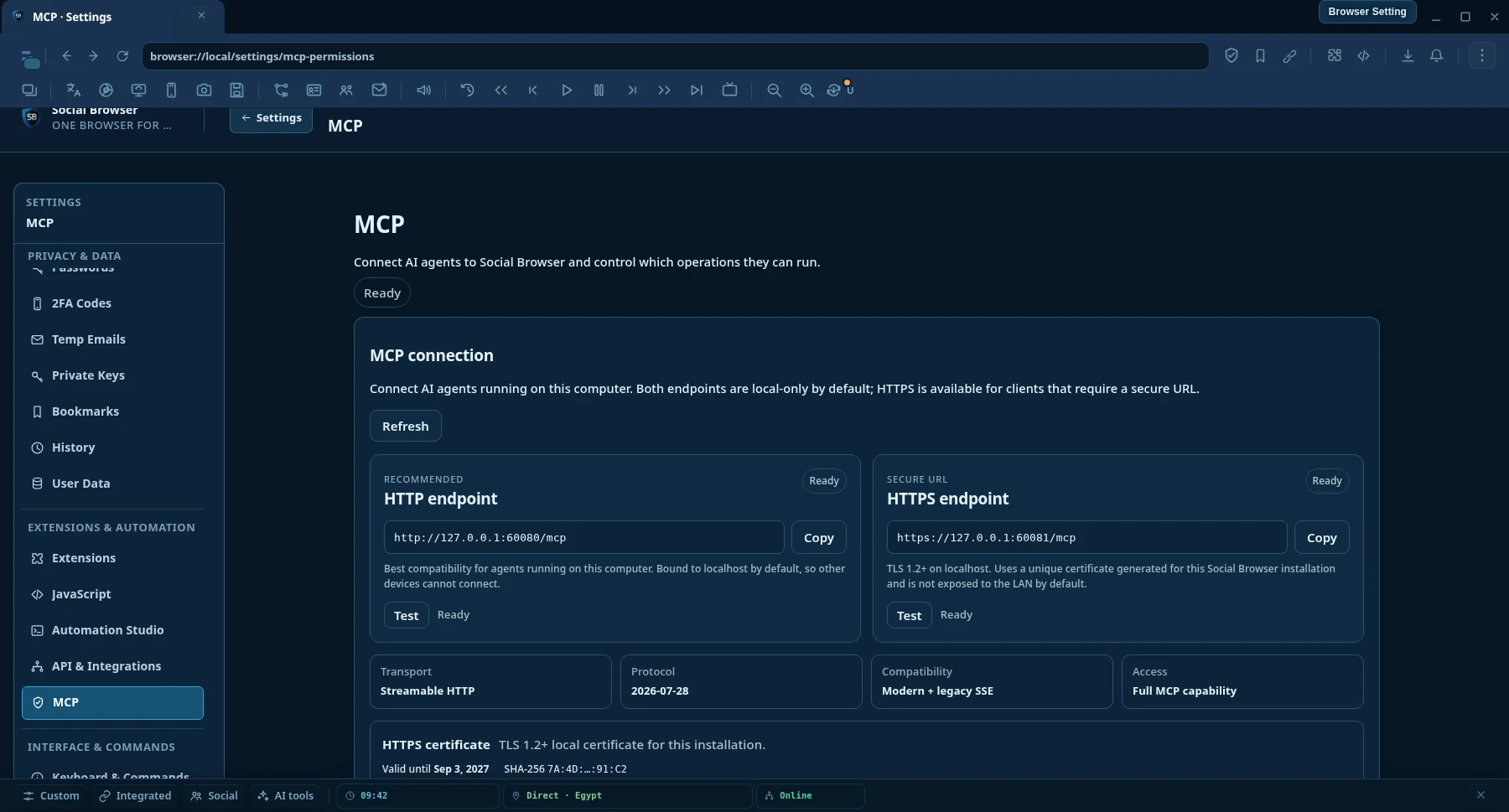
Endpoint HTTP
Melhor compatibilidade local para clientes MCP AI executados no mesmo computador que o Social Browser.
http://127.0.0.1:60080/mcp- Streamable HTTP
- Somente local por padrão
- Não exige configuração de certificado
Model Context Protocol · MCP AI
Connect any MCP AI-compatible clients to a persistent Social Browser session. Search and read the web, control real logged-in Profiles, automate browser work, manage proxies and run long tasks from one endpoint.

Veja o produto
Escolha o que a IA pode ler, automatizar e controlar por meio das permissões MCP.
Conexão MCP AI
Ambos os endpoints são apenas locais por padrão. Use HTTP para máxima compatibilidade local ou HTTPS quando o cliente de IA exigir uma URL segura e criptografada.
Melhor compatibilidade local para clientes MCP AI executados no mesmo computador que o Social Browser.
http://127.0.0.1:60080/mcpTransporte MCP AI local criptografado para clientes e runtimes que exigem uma URL HTTPS.
https://127.0.0.1:60081/mcpCertificado HTTPS
O Social Browser gera um certificado local autoassinado e exclusivo para cada instalação. Abra Settings → MCP AI Permissions e use Download certificate (.crt) ou Copy PEM. Se o cliente de IA fizer validação TLS estrita, importe esse certificado público para o repositório de confiança do runtime.
Why Social Browser MCP AI
Normal browser-control integrations often expose low-level actions and leave the AI to assemble everything itself. Social Browser MCP AI adds higher-level discovery, research, automation and verification on top of real persistent browser Profiles.
AI can work inside persistent Profiles with the browser state already used by the user, including cookies, local storage, settings and user-supplied proxy context.
Search engines, clean URL reading, semantic page snapshots, in-page find, structured extraction and concurrent multi-page research are first-class MCP AI operations.
Workflows, tasks, waits, verification, evidence, recovery and execution receipts help agents check what actually happened instead of trusting a toast message.
MCP AI operation settings can allow actions automatically, ask first or block them. This keeps unattended tasks practical while leaving the final policy with the device owner.
Capabilities
The catalog is discoverable by the AI, so clients do not need to memorize every operation name before they can work.
search.web structured web searchweb.read clean URL readingweb.snapshot, web.find and web.extractweb.readMany and searchAndReadbrowser.tabs.screenshot para o conteúdo de uma aba gerenciadabrowser.desktop.sources.list para monitores e janelas de aplicativosbrowser.desktop.screenshot para uma tela ou janela selecionadaVerdade das capacidades
O Social Browser separa a descoberta de ferramentas da realidade da implementação. Um agente pode verificar se uma operação está registrada, implementada, executável pela política atual, bloqueada, aguardando aprovação ou exposta apenas como contrato estável.
browser.agent.capability.truth browser.agent.capability.check browser.agent.runtime.verify browser.agent.unattended.check A operação está exposta ao MCP AI?
Existe um executor real nesta versão?
Está permitida agora, exige aprovação ou está bloqueada?
O runtime pode fazer uma verificação prévia sem fingir que ocorreu um resultado externo?
Isso evita confundir um esquema ou resultado de autorização com prova de que uma ação no host foi realmente executada.
Two-tier web reader
web.read starts with a fast direct HTTP reader for ordinary public pages. When JavaScript rendering, cookies, authenticated state, a Profile proxy, geographic context or other browser state is required, Social Browser can read the page through a real persistent Profile.
searchAndRead({ query: "browser automation MCP", maxResults: 5, read: { mode: "auto", profileId: "my-profile" } }) Search → choose result URLs → read pages concurrently → return structured content to the AI.
Quick setup
O Social Browser expõe endpoints MCP AI locais via Streamable HTTP e HTTPS. HTTP é o padrão recomendado para máxima compatibilidade; HTTPS está disponível quando o cliente exige uma URL segura.
Keep Social Browser open on the computer that owns the Profiles and browser state you want the AI to use.
Use HTTP para a configuração local mais simples ou HTTPS quando o cliente exigir TLS. Ambos expõem as mesmas ferramentas MCP AI.
http://127.0.0.1:60080/mcphttps://127.0.0.1:60081/mcpReconnect after MCP AI updates so the client reloads the tool catalog, then describe the task in normal language. Agent Discovery can find the right tools and schemas automatically.
Add this to %USERPROFILE%\.codex\config.toml, then restart Codex.
[mcp_servers.social_browser] enabled = true url = "http://127.0.0.1:60080/mcp"
Se o Codex ou outro cliente exigir HTTPS, use https://127.0.0.1:60081/mcp e confie no certificado público nas configurações MCP AI do Social Browser se o runtime validar certificados locais de forma estrita.
Choose a Streamable HTTP MCP AI server and use the same endpoint. Client UI and configuration file names differ between products.
http://127.0.0.1:60080/mcphttps://127.0.0.1:60081/mcpConexões remotas exigem binding explícito do servidor e configuração de segurança de rede. Elas não são habilitadas apenas alterando o IP do endpoint.
Recommended agent flow
The AI does not need to guess operation names or assume an action worked.
browser.agent.guide and capability discovery.browser.agent.tools.search to find the best operation for the goal.browser.agent.tools.get before calling unfamiliar tools.MCP AI operation policies
Social Browser uses operation-level policies. You decide which operation categories run automatically, which require approval and which are blocked. That means repetitive trusted tasks do not need to stop only because the user is not sitting at the computer.
Policies belong to the Social Browser user. An AI client cannot silently rewrite its own approval policy.
What can I ask it to do?
“Open my Client A Profile, go to the dashboard, export the current report and confirm the download finished.”
“Search the web for changes in these five competitors, read the most relevant pages and summarize only what changed this week.”
“Test every proxy in the list in parallel, keep the healthy and slow ones, and bulk-delete the failed results.”
“Create a Workflow that opens this page, fills the form, waits for the result, extracts the confirmation ID and verifies it was saved.”
“Find every Profile tagged Marketing, open the same URL in each one and run this approved workflow.”
“Inspect the current tab, find the correct submit button by role or label, click it, then verify the page state changed.”
“Capture a aba atual, depois a janela do aplicativo se necessário, inspecione o que está visível e diga o que mudou.”
Perguntas frequentes
No. Low-level page actions are available, but MCP AI also exposes Profiles, automation, tasks, proxy management, bulk operations, semantic page understanding, web search, clean URL reading, extraction, verification, recovery and diagnostics.
Yes. Profile-backed operations can use persistent Social Browser Profile state. This is useful when a page depends on cookies, an authenticated session, JavaScript rendering, Profile settings or user-supplied proxy context.
Yes. Operation-level MCP AI policies are designed for unattended tasks. You choose what runs automatically, what asks first and what is blocked.
No. Social Browser lets you add and manage your own proxies. The Proxy Manager can also work with editable public free-proxy list sources, but public proxies can be unstable and should be tested before use.
The Agent Discovery layer provides a guide, searchable tool catalog, schemas, capability truth and plan validation so compatible agents can discover operations instead of relying on a hard-coded list.
Restart or reconnect the MCP AI client if it still shows an old tool catalog. Many clients cache tool definitions for the lifetime of the connection.
Sim. Use https://127.0.0.1:60081/mcp. O Social Browser cria um certificado local exclusivo para a instalação e permite baixar o arquivo público .crt ou copiar o PEM nas configurações MCP AI.
Não. HTTP e HTTPS expõem o mesmo catálogo de operações MCP AI. HTTPS criptografa o transporte local; não libera ferramentas extras nem altera suas políticas.
O endpoint HTTPS padrão usa um certificado local autoassinado por instalação. Clientes com validação estrita podem precisar importar esse certificado público no repositório de confiança do runtime. A chave privada nunca é exportada.
Não. O acesso remoto é desativado por padrão e exige binding explícito do servidor e segurança de rede adequada. O certificado HTTPS local padrão é destinado a localhost e endereços de loopback.
Não. Capability Truth distingue ferramentas registradas de executores implementados e do estado atual da política. Os agentes podem verificar a capacidade e a prontidão do runtime antes de afirmar que uma operação pode ser executada.
Browser control for AI
Download Social Browser, connect your MCP AI client and let your automation work with the same Profiles and browser state you already use.
MCP reference
Use the capability catalog for tool domains and contract rules, then use the client setup guide to connect a compatible MCP client.
Capability truth, stable resource identity, executor truth, and runtime discovery.
Open MCP Tools →Connect Streamable HTTP clients to the local Social Browser MCP endpoint.
Open MCP Clients →