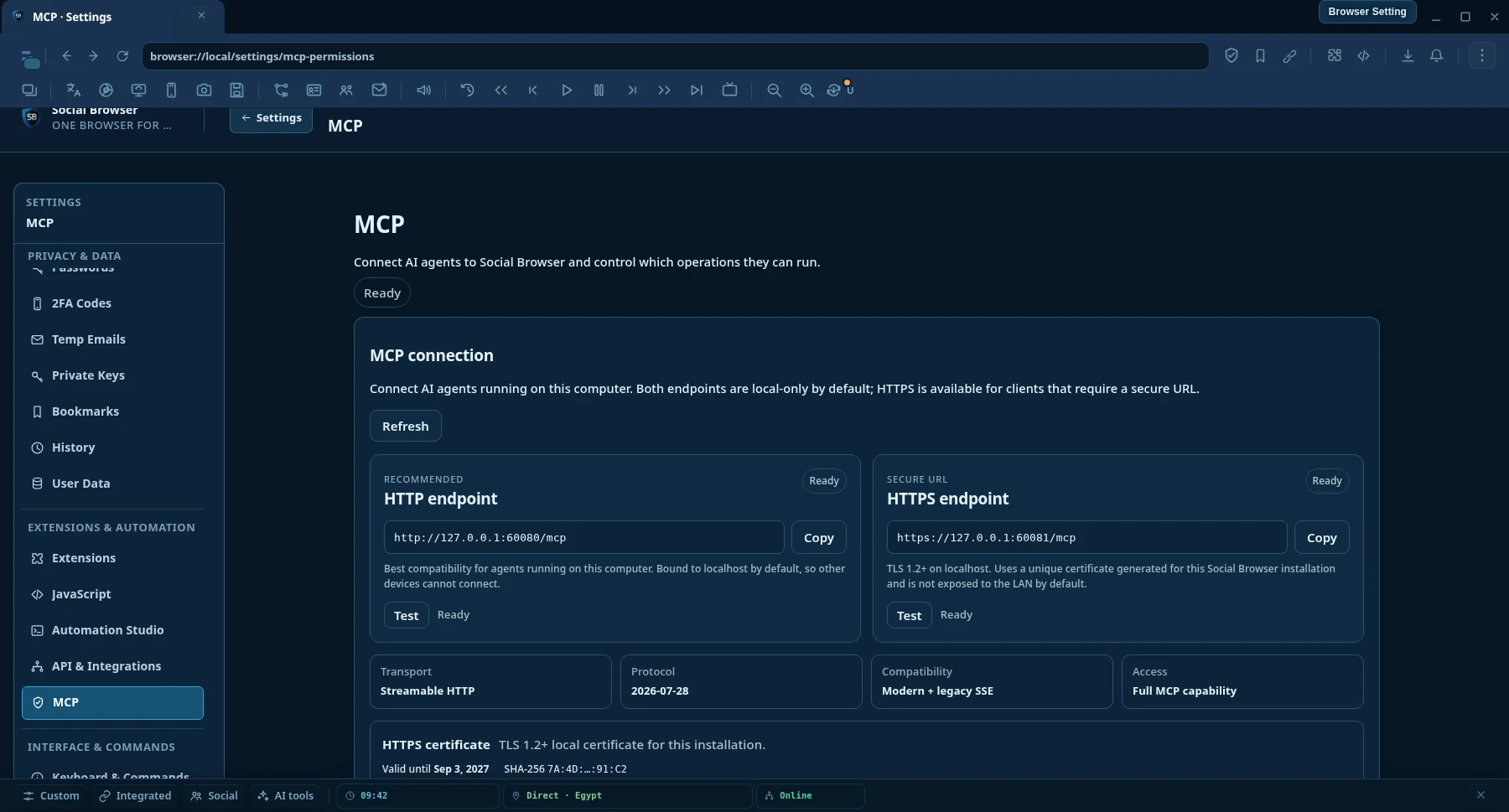
HTTP-эндпоинт
Максимальная локальная совместимость для MCP AI-клиентов, работающих на том же компьютере, что и Social Browser.
http://127.0.0.1:60080/mcp- Streamable HTTP
- По умолчанию только локально
- Настройка сертификата не требуется
Model Context Protocol · MCP AI
Connect any MCP AI-compatible clients to a persistent Social Browser session. Search and read the web, control real logged-in Profiles, automate browser work, manage proxies and run long tasks from one endpoint.

Посмотреть продукт
Определяйте через разрешения MCP, что ИИ может читать, автоматизировать и контролировать.
MCP AI-соединение
По умолчанию оба эндпоинта доступны только локально. Используйте HTTP для максимальной локальной совместимости или HTTPS, если AI-клиенту требуется защищённый зашифрованный URL.
Максимальная локальная совместимость для MCP AI-клиентов, работающих на том же компьютере, что и Social Browser.
http://127.0.0.1:60080/mcpЗашифрованный локальный MCP AI-транспорт для клиентов и сред выполнения, которым нужен HTTPS-URL.
https://127.0.0.1:60081/mcpHTTPS-сертификат
Social Browser создаёт уникальный локальный самоподписанный сертификат для каждой установки. Откройте Settings → MCP AI Permissions и используйте Download certificate (.crt) или Copy PEM. Если AI-клиент строго проверяет TLS, импортируйте публичный сертификат в хранилище доверия его среды выполнения.
Why Social Browser MCP AI
Normal browser-control integrations often expose low-level actions and leave the AI to assemble everything itself. Social Browser MCP AI adds higher-level discovery, research, automation and verification on top of real persistent browser Profiles.
AI can work inside persistent Profiles with the browser state already used by the user, including cookies, local storage, settings and user-supplied proxy context.
Search engines, clean URL reading, semantic page snapshots, in-page find, structured extraction and concurrent multi-page research are first-class MCP AI operations.
Workflows, tasks, waits, verification, evidence, recovery and execution receipts help agents check what actually happened instead of trusting a toast message.
MCP AI operation settings can allow actions automatically, ask first or block them. This keeps unattended tasks practical while leaving the final policy with the device owner.
Capabilities
The catalog is discoverable by the AI, so clients do not need to memorize every operation name before they can work.
search.web structured web searchweb.read clean URL readingweb.snapshot, web.find and web.extractweb.readMany and searchAndReadbrowser.tabs.screenshot для содержимого управляемой вкладкиbrowser.desktop.sources.list для мониторов и окон приложенийbrowser.desktop.screenshot для экрана или выбранного окнаИстина о возможностях
Social Browser отделяет обнаружение инструментов от факта их реализации. Агент может проверить, зарегистрирована ли операция, реализована ли она, разрешена ли текущей политикой, заблокирована, ожидает одобрения или представлена только как стабильный контракт.
browser.agent.capability.truth browser.agent.capability.check browser.agent.runtime.verify browser.agent.unattended.check Доступна ли операция через MCP AI?
Есть ли в этой версии реальный исполнитель операции?
Разрешено ли это сейчас, требуется одобрение или операция заблокирована?
Может ли среда выполнения заранее проверить это, не выдавая проверку за внешний результат?
Это не позволяет принять наличие схемы или результат авторизации за доказательство реального выполнения действия на хосте.
Two-tier web reader
web.read starts with a fast direct HTTP reader for ordinary public pages. When JavaScript rendering, cookies, authenticated state, a Profile proxy, geographic context or other browser state is required, Social Browser can read the page through a real persistent Profile.
searchAndRead({ query: "browser automation MCP", maxResults: 5, read: { mode: "auto", profileId: "my-profile" } }) Search → choose result URLs → read pages concurrently → return structured content to the AI.
Quick setup
Social Browser предоставляет локальные MCP AI-эндпоинты Streamable HTTP и HTTPS. HTTP рекомендуется по умолчанию для максимальной совместимости; HTTPS доступен клиентам, которым нужен защищённый URL.
Keep Social Browser open on the computer that owns the Profiles and browser state you want the AI to use.
Используйте HTTP для самой простой локальной настройки или HTTPS, если клиент требует TLS. Оба варианта предоставляют те же MCP AI-инструменты.
http://127.0.0.1:60080/mcphttps://127.0.0.1:60081/mcpReconnect after MCP AI updates so the client reloads the tool catalog, then describe the task in normal language. Agent Discovery can find the right tools and schemas automatically.
Add this to %USERPROFILE%\.codex\config.toml, then restart Codex.
[mcp_servers.social_browser] enabled = true url = "http://127.0.0.1:60080/mcp"
Если Codex или другому клиенту нужен HTTPS, используйте https://127.0.0.1:60081/mcp и добавьте публичный сертификат из настроек MCP AI Social Browser в доверенные, если среда строго проверяет локальные сертификаты.
Choose a Streamable HTTP MCP AI server and use the same endpoint. Client UI and configuration file names differ between products.
http://127.0.0.1:60080/mcphttps://127.0.0.1:60081/mcpУдалённые соединения требуют явной привязки сервера и настройки сетевой безопасности. Одной замены IP в эндпоинте недостаточно.
Recommended agent flow
The AI does not need to guess operation names or assume an action worked.
browser.agent.guide and capability discovery.browser.agent.tools.search to find the best operation for the goal.browser.agent.tools.get before calling unfamiliar tools.MCP AI operation policies
Social Browser uses operation-level policies. You decide which operation categories run automatically, which require approval and which are blocked. That means repetitive trusted tasks do not need to stop only because the user is not sitting at the computer.
Policies belong to the Social Browser user. An AI client cannot silently rewrite its own approval policy.
What can I ask it to do?
“Open my Client A Profile, go to the dashboard, export the current report and confirm the download finished.”
“Search the web for changes in these five competitors, read the most relevant pages and summarize only what changed this week.”
“Test every proxy in the list in parallel, keep the healthy and slow ones, and bulk-delete the failed results.”
“Create a Workflow that opens this page, fills the form, waits for the result, extracts the confirmation ID and verifies it was saved.”
“Find every Profile tagged Marketing, open the same URL in each one and run this approved workflow.”
“Inspect the current tab, find the correct submit button by role or label, click it, then verify the page state changed.”
«Сделай снимок текущей вкладки, при необходимости захвати окно приложения, проверь, что видно, и скажи, что изменилось.»
Частые вопросы
No. Low-level page actions are available, but MCP AI also exposes Profiles, automation, tasks, proxy management, bulk operations, semantic page understanding, web search, clean URL reading, extraction, verification, recovery and diagnostics.
Yes. Profile-backed operations can use persistent Social Browser Profile state. This is useful when a page depends on cookies, an authenticated session, JavaScript rendering, Profile settings or user-supplied proxy context.
Yes. Operation-level MCP AI policies are designed for unattended tasks. You choose what runs automatically, what asks first and what is blocked.
No. Social Browser lets you add and manage your own proxies. The Proxy Manager can also work with editable public free-proxy list sources, but public proxies can be unstable and should be tested before use.
The Agent Discovery layer provides a guide, searchable tool catalog, schemas, capability truth and plan validation so compatible agents can discover operations instead of relying on a hard-coded list.
Restart or reconnect the MCP AI client if it still shows an old tool catalog. Many clients cache tool definitions for the lifetime of the connection.
Да. Используйте https://127.0.0.1:60081/mcp. Social Browser создаёт уникальный локальный сертификат для установки и позволяет скачать публичный файл .crt или скопировать PEM из настроек MCP AI.
Нет. HTTP и HTTPS предоставляют один и тот же каталог MCP AI-операций. HTTPS шифрует локальный транспорт, но не открывает дополнительные инструменты и не меняет политики.
HTTPS-эндпоинт по умолчанию использует отдельный для каждой установки локальный самоподписанный сертификат. Клиентам со строгой проверкой может потребоваться импортировать публичный сертификат в хранилище доверия среды. Закрытый ключ никогда не экспортируется.
Нет. Удалённый доступ по умолчанию отключён и требует явной привязки сервера и соответствующей сетевой защиты. Локальный HTTPS-сертификат по умолчанию предназначен для localhost и loopback-адресов.
Нет. Capability Truth отличает зарегистрированные инструменты от реализованных исполнителей и текущего состояния политики. Агент может проверить возможности и готовность среды до заявления о выполнимости операции.

Browser control for AI
Download Social Browser, connect your MCP AI client and let your automation work with the same Profiles and browser state you already use.
MCP reference
Use the capability catalog for tool domains and contract rules, then use the client setup guide to connect a compatible MCP client.
Capability truth, stable resource identity, executor truth, and runtime discovery.
Open MCP Tools →Connect Streamable HTTP clients to the local Social Browser MCP endpoint.
Open MCP Clients →