
Social BrowserProfiles, IA y automatización

Model Context Protocol · MCP AI

Give your AI real browser control.

Connect any MCP AI-compatible clients to a persistent Social Browser session. Search and read the web, control real logged-in Profiles, automate browser work, manage proxies and run long tasks from one endpoint.

Persistent ProfilesStreamable HTTPHTTPS · TLS 1.2+Agent DiscoveryWeb Intelligence
Permisos de MCP AI

Mira el producto

Da a la IA acceso controlado al navegador real.

Elige qué puede leer, automatizar y controlar la IA mediante permisos MCP.

One endpointBrowser, Profiles, automation and research.
Persistent stateUse real cookies, sessions and Profile context.
Full-control designThe user chooses operation policies.
Agent-readyDiscovery, schemas, verification and evidence.

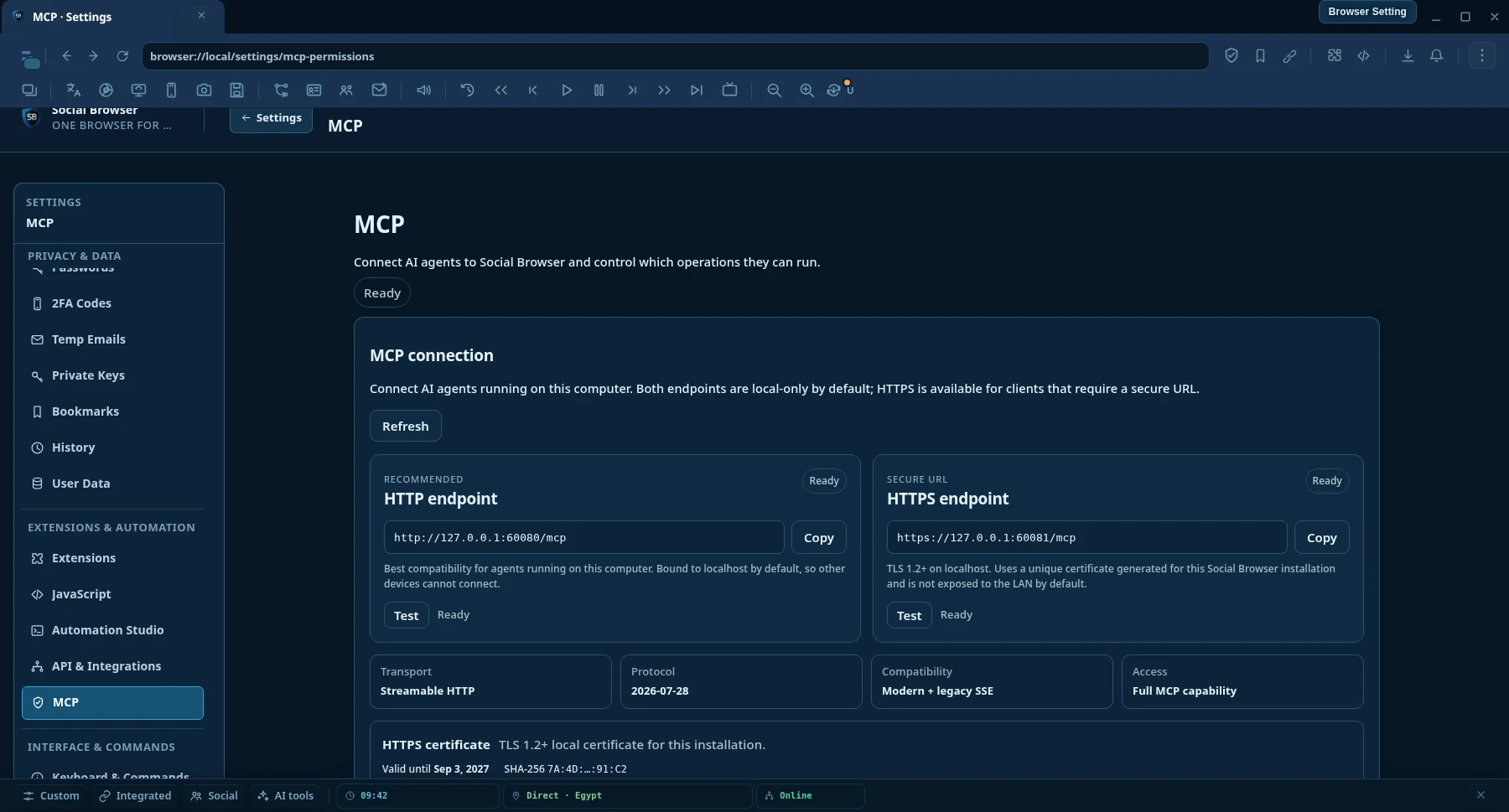
Conexión MCP AI

HTTP o HTTPS. Las mismas herramientas MCP AI, distinto transporte.

Ambos endpoints son solo locales de forma predeterminada. Usa HTTP para la máxima compatibilidad local o HTTPS cuando tu cliente de IA requiera una URL segura y cifrada.

Transporte principal

Endpoint HTTP

Recomendado

La mejor compatibilidad local para clientes MCP AI que se ejecutan en el mismo equipo que Social Browser.

http://127.0.0.1:60080/mcp
  • Streamable HTTP
  • Solo local por defecto
  • No requiere configurar certificado
URL segura

Endpoint HTTPS

TLS 1.2+

Transporte MCP AI local cifrado para clientes y runtimes que requieren una URL HTTPS.

https://127.0.0.1:60081/mcp
  • TLS 1.2 o posterior
  • Certificado único por instalación
  • Las mismas capacidades MCP AI que HTTP

Certificado HTTPS

Confía en el certificado local en clientes estrictos.

Social Browser genera un certificado local autofirmado y único para cada instalación. Abre Settings → MCP AI Permissions y usa Download certificate (.crt) o Copy PEM. Si tu cliente de IA aplica validación TLS estricta, importa ese certificado público en el almacén de confianza del runtime.

La clave privada nunca se exporta.El certificado cubre localhost y las direcciones loopback.HTTPS cifra el transporte; no concede permisos MCP AI adicionales.
El acceso remoto está desactivado por defecto. No sustituyas simplemente 127.0.0.1 por la IP del PC. La escucha remota debe habilitarse explícitamente y protegerse para la red de confianza. El certificado HTTPS local predeterminado está pensado para localhost y direcciones loopback.
Compatibilidad de transporte Streamable HTTP es el transporte MCP AI principal. Social Browser también mantiene compatibilidad con HTTP/SSE heredado e integraciones locales stdio o named-pipe.

Why Social Browser MCP AI

Not just remote clicks. Give AI first-class web intelligence.

Normal browser-control integrations often expose low-level actions and leave the AI to assemble everything itself. Social Browser MCP AI adds higher-level discovery, research, automation and verification on top of real persistent browser Profiles.

01

Real authenticated Profiles

AI can work inside persistent Profiles with the browser state already used by the user, including cookies, local storage, settings and user-supplied proxy context.

02

Search and read the web

Search engines, clean URL reading, semantic page snapshots, in-page find, structured extraction and concurrent multi-page research are first-class MCP AI operations.

03

Automation that can prove results

Workflows, tasks, waits, verification, evidence, recovery and execution receipts help agents check what actually happened instead of trusting a toast message.

04

You decide the policy

MCP AI operation settings can allow actions automatically, ask first or block them. This keeps unattended tasks practical while leaving the final policy with the device owner.

Capabilities

One MCP AI connection. The whole Social Browser workflow.

The catalog is discoverable by the AI, so clients do not need to memorize every operation name before they can work.

P

Profiles & browser control

  • Create, edit, open and organize persistent Profiles
  • Control tabs, windows, popups and downloads
  • Click, fill, type, scroll and execute JavaScript
  • Use real authenticated browser context
W

Web Intelligence

  • search.web structured web search
  • web.read clean URL reading
  • web.snapshot, web.find and web.extract
  • web.readMany and searchAndRead
A

Automation & tasks

  • Canonical Workflow action DSL
  • Automations define where and how work runs
  • Tasks bind, schedule and persist execution
  • Conditions, loops, variables and checkpoints
B

Bulk operations & jobs

  • Filter or ID-based bulk selection
  • Preview / dry-run before execution
  • Safe batch actions across mutable lists
  • Background jobs with progress, results and cancel
X

Proxy control

  • Import, edit, organize and assign proxies
  • Parallel testing with configurable concurrency
  • Editable free-proxy sources
  • Long-running test jobs without holding MCP AI requests open
AI

Agent runtime & verification

  • Capability discovery and semantic tool search
  • Schema lookup before execution
  • Inspect, wait, verify and recover
  • Evidence, receipts, Capability Truth and diagnostics
S

Scripts, settings & resources

  • User Scripts and compatible extensions
  • User-Agent, bookmarks, history and modes
  • Cookies, 2FA resources and browser state
  • Downloads and other list resources
OS

System layer & operation policies

  • HTTP fetch and system capability contracts
  • Operation-level Allow / Ask / Block settings
  • Temporary and persistent grants
  • Unattended-readiness checks before long tasks
V

Comprensión visual y capturas de pantalla

  • browser.tabs.screenshot para el contenido de una pestaña administrada
  • browser.desktop.sources.list para monitores y ventanas de aplicaciones
  • browser.desktop.screenshot para una pantalla o ventana seleccionada
  • PNG/JPEG, regiones de recorte y contenido de imagen MCP AI nativo
R

Grabador, acciones y condiciones

  • Graba eventos de interacción del navegador para automatización reutilizable
  • Ejecuta acciones mantenidas del navegador mediante la capa de acciones compartida
  • Evalúa, valida y espera condiciones
  • Combina la interacción grabada con Workflows y verificación

Verdad de capacidades

Sepa qué está implementado realmente antes de que un agente afirme que puede ejecutarlo.

Social Browser separa el descubrimiento de herramientas de la realidad de su implementación. Un agente puede comprobar si una operación está registrada, implementada, ejecutable según la política actual, bloqueada, pendiente de aprobación o expuesta solo como contrato estable.

browser.agent.capability.truth browser.agent.capability.check browser.agent.runtime.verify browser.agent.unattended.check
01Descubierta

¿La operación está expuesta a MCP AI?

02Implementada

¿Existe un ejecutor real en esta versión?

03Lista según política

¿Está permitida ahora, requiere aprobación o está bloqueada?

04Verificado

¿Puede el runtime comprobarlo previamente sin fingir que ocurrió un resultado externo?

Esto evita confundir un esquema o un resultado de autorización con la prueba de que una acción del host se ejecutó realmente.

Two-tier web reader

Read fast when possible. Use the real browser when needed.

web.read starts with a fast direct HTTP reader for ordinary public pages. When JavaScript rendering, cookies, authenticated state, a Profile proxy, geographic context or other browser state is required, Social Browser can read the page through a real persistent Profile.

URLDirect readerStructured content
Protected / dynamic URLProfile readerRendered page state
Example research request
searchAndRead({ query: "browser automation MCP", maxResults: 5, read: { mode: "auto", profileId: "my-profile" } })

Search → choose result URLs → read pages concurrently → return structured content to the AI.

Quick setup

Connect an MCP AI client in minutes.

Social Browser expone endpoints MCP AI locales mediante Streamable HTTP y HTTPS. HTTP es la opción recomendada por defecto para máxima compatibilidad; HTTPS está disponible cuando el cliente requiere una URL segura.

1

Run Social Browser

Keep Social Browser open on the computer that owns the Profiles and browser state you want the AI to use.

2

Elige HTTP o HTTPS

Usa HTTP para la configuración local más sencilla o HTTPS cuando el cliente requiera TLS. Ambos exponen las mismas herramientas MCP AI.

http://127.0.0.1:60080/mcp
https://127.0.0.1:60081/mcp
3

Reconnect, then ask normally

Reconnect after MCP AI updates so the client reloads the tool catalog, then describe the task in normal language. Agent Discovery can find the right tools and schemas automatically.

¿Listo para probarlo?Download Social Browser, connect your AI client, and start with a real persistent Profile.Descargar Social Browser

Codex

Streamable HTTP

Add this to %USERPROFILE%\.codex\config.toml, then restart Codex.

[mcp_servers.social_browser] enabled = true url = "http://127.0.0.1:60080/mcp"

Si Codex u otro cliente requiere HTTPS, usa https://127.0.0.1:60081/mcp y confía en el certificado público desde la configuración MCP AI de Social Browser si el runtime valida estrictamente los certificados locales.

Other MCP AI clients

Standard endpoint

Choose a Streamable HTTP MCP AI server and use the same endpoint. Client UI and configuration file names differ between products.

http://127.0.0.1:60080/mcp
https://127.0.0.1:60081/mcp

Las conexiones remotas requieren un enlace explícito del servidor y configuración de seguridad de red. No se habilitan solo cambiando la IP del endpoint.

Recommended agent flow

Discover → understand → execute → verify.

The AI does not need to guess operation names or assume an action worked.

  1. Discover capabilitiesStart with browser.agent.guide and capability discovery.
  2. Search toolsUse browser.agent.tools.search to find the best operation for the goal.
  3. Get the schemaUse browser.agent.tools.get before calling unfamiliar tools.
  4. ExecuteCall the exact browser, automation, research or bulk operation.
  5. Verify the outcomeInspect page state, resource state or evidence instead of trusting a visual notification.

MCP AI operation policies

Built for automation that can keep running when you are away.

Social Browser uses operation-level policies. You decide which operation categories run automatically, which require approval and which are blocked. That means repetitive trusted tasks do not need to stop only because the user is not sitting at the computer.

Allow AutomaticallyRun this operation category without asking.
Ask Before ExecutionAllow once, temporarily or always when prompted.
BlockDo not execute this operation category.

Policies belong to the Social Browser user. An AI client cannot silently rewrite its own approval policy.

What can I ask it to do?

Use normal language. Let the MCP AI expose the right tools.

“Open my Client A Profile, go to the dashboard, export the current report and confirm the download finished.”
“Search the web for changes in these five competitors, read the most relevant pages and summarize only what changed this week.”
“Test every proxy in the list in parallel, keep the healthy and slow ones, and bulk-delete the failed results.”
“Create a Workflow that opens this page, fills the form, waits for the result, extracts the confirmation ID and verifies it was saved.”
“Find every Profile tagged Marketing, open the same URL in each one and run this approved workflow.”
“Inspect the current tab, find the correct submit button by role or label, click it, then verify the page state changed.”
«Captura la pestaña actual, luego la ventana de la aplicación si es necesario, inspecciona lo visible y dime qué cambió.»

Preguntas frecuentes

Common MCP AI questions

Does Social Browser MCP AI only control tabs and clicks?

No. Low-level page actions are available, but MCP AI also exposes Profiles, automation, tasks, proxy management, bulk operations, semantic page understanding, web search, clean URL reading, extraction, verification, recovery and diagnostics.

Can AI use an already logged-in browser session?

Yes. Profile-backed operations can use persistent Social Browser Profile state. This is useful when a page depends on cookies, an authenticated session, JavaScript rendering, Profile settings or user-supplied proxy context.

Can it work without me watching every action?

Yes. Operation-level MCP AI policies are designed for unattended tasks. You choose what runs automatically, what asks first and what is blocked.

Does Social Browser provide proxies?

No. Social Browser lets you add and manage your own proxies. The Proxy Manager can also work with editable public free-proxy list sources, but public proxies can be unstable and should be tested before use.

How does the AI know which MCP AI tool to use?

The Agent Discovery layer provides a guide, searchable tool catalog, schemas, capability truth and plan validation so compatible agents can discover operations instead of relying on a hard-coded list.

What happens after Social Browser MCP AI is updated?

Restart or reconnect the MCP AI client if it still shows an old tool catalog. Many clients cache tool definitions for the lifetime of the connection.

¿Puedo usar HTTPS para MCP AI?

Sí. Usa https://127.0.0.1:60081/mcp. Social Browser crea un certificado local único para la instalación y permite descargar el archivo público .crt o copiar su PEM desde MCP AI Settings.

¿HTTP y HTTPS exponen herramientas MCP AI diferentes?

No. HTTP y HTTPS exponen el mismo catálogo de operaciones MCP AI. HTTPS cifra el transporte local; no desbloquea herramientas adicionales ni cambia tus políticas.

¿Por qué un cliente HTTPS estricto puede rechazar el certificado local?

El endpoint HTTPS predeterminado usa un certificado local autofirmado por instalación. Los clientes con validación estricta pueden necesitar importar ese certificado público en el almacén de confianza del runtime. La clave privada nunca se exporta.

¿Puedo conectarme desde otro equipo sustituyendo 127.0.0.1?

No. El acceso remoto está desactivado por defecto y requiere un enlace explícito del servidor y seguridad de red adecuada. El certificado HTTPS local predeterminado está pensado para localhost y direcciones loopback.

¿Cada esquema MCP AI descubierto significa que la acción está implementada?

No. Capability Truth distingue las herramientas registradas de los ejecutores implementados y del estado actual de la política. Los agentes pueden comprobar la capacidad y la preparación del runtime antes de afirmar que una operación puede ejecutarse.

Browser control for AI

Give your AI a persistent browser, not a disposable session.

Download Social Browser, connect your MCP AI client and let your automation work with the same Profiles and browser state you already use.

MCP reference

Discover the live capability surface

Use the capability catalog for tool domains and contract rules, then use the client setup guide to connect a compatible MCP client.

MCP Tools Catalog

Capability truth, stable resource identity, executor truth, and runtime discovery.

Open MCP Tools →

MCP Client Setup

Connect Streamable HTTP clients to the local Social Browser MCP endpoint.

Open MCP Clients →