Social BrowserProfiles, AI और ऑटोमेशन

Social Browser की विशेषताएँ

Profiles, AI ऑटोमेशन और ब्राउज़र कंट्रोल एक ही जगह।

अकाउंट अलग रखें, उसी browser state पर वापस आएँ, दोहराए जाने वाले काम ऑटोमेट करें और MCP AI-compatible clients को खोज, पढ़ने और ब्राउज़र कंट्रोल के लिए जोड़ें।

सही अकाउंट जल्दी खोलेंस्थायी प्रोफ़ाइल स्वीकृत सेशन स्टेट को तैयार रखती हैं।
दोहराए जाने वाले ब्राउज़र काम को ऑटोमेट करेंJavaScript और User Scripts ब्राउज़िंग वर्कफ़्लो के पास ही रहते हैं।
कस्टमाइज़ेशन एक जगह रखेंप्रोफ़ाइल, स्क्रिप्ट, एक्सटेंशन, प्राइवेसी कंट्रोल और प्रॉक्सी सेटिंग्स एक ही ब्राउज़र के आसपास काम करते हैं।

प्रोडक्ट प्रमाण

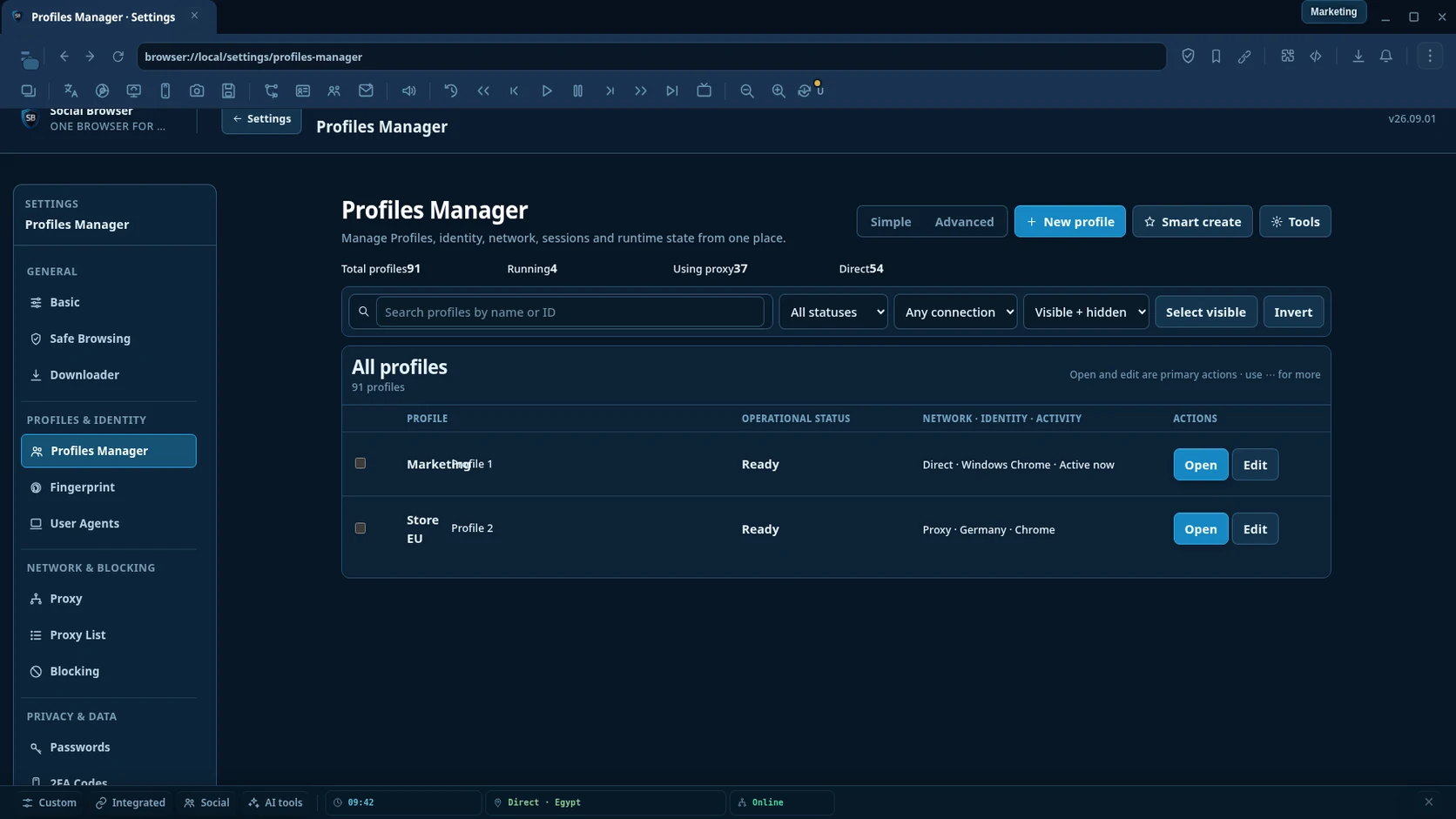
एक प्रोफ़ाइल वह ब्राउज़र स्टेट बनाए रखती है जिसकी आपके वर्कफ़्लो को ज़रूरत है।

प्रोफ़ाइल दोबारा खोलें और उसकी कुकीज़, लोकल स्टोरेज, ब्राउज़र सेटिंग्स और वैकल्पिक प्रॉक्सी कॉन्फ़िगरेशन पर लौटें। मैन्युअल काम और ऑटोमेशन एक ही प्रोफ़ाइल कॉन्टेक्स्ट इस्तेमाल कर सकते हैं।

  • अलग कुकीज़, सेशन, स्टोरेज और प्रोफ़ाइल सेटिंग्स
  • हर प्रोफ़ाइल के लिए यूज़र द्वारा दिया गया प्रॉक्सी कॉन्फ़िगरेशन
  • स्थायी प्रमाणित ब्राउज़र कॉन्टेक्स्ट
  • एक ही वातावरण में मैन्युअल और ऑटोमेटेड काम

मुख्य क्षमताएँ

छह क्षेत्र, प्रोडक्ट को उपयोगी बनाने वाली प्राथमिकता के क्रम में।

ब्राउज़र की बुनियादी सुविधाएँ अभी भी मौजूद हैं। नीचे के सेक्शन पहले उन क्षमताओं पर ध्यान देते हैं जिन्हें सामान्य ब्राउज़र प्रोफ़ाइल से बदलना मुश्किल है।

पहली बार चलाने पर 100 सार्वजनिक मुफ़्त प्रॉक्सीनई इंस्टॉलेशन के पहली बार शुरू होने पर Social Browser सक्षम सार्वजनिक इंटरनेट स्रोतों से अपने-आप 100 तक प्रॉक्सी आयात करता है।
सार्वजनिक प्रॉक्सी स्रोतों से हजारों और प्राप्त करेंProxy List संपादन योग्य इंटरनेट स्रोतों से हजारों सार्वजनिक प्रॉक्सी प्राप्त कर सकती है। आपकी योजना तय करती है कि एक समय में कितने प्रॉक्सी सहेजे जा सकते हैं।

01 · स्थायी प्रोफ़ाइल

प्रोफ़ाइल स्टेट को अलग और दोबारा उपयोग योग्य रखें।

हर ब्राउज़र प्रोफ़ाइल अपनी कुकीज़, स्टोरेज, ब्राउज़िंग स्टेट, सेटिंग्स और वैकल्पिक यूज़र-प्रदान प्रॉक्सी कॉन्फ़िगरेशन रखती है।

प्रोफ़ाइल आइसोलेशनअलग कुकीज़ और लोकल स्टोरेज।

Build with AI is optional: Bring your own AI provider, keep Encrypted provider keys, review the draft, then save only when it is valid.

स्थायी सेशनबाद में उसी प्रोफ़ाइल स्टेट पर लौटें।
हर प्रोफ़ाइल के लिए प्रॉक्सीजहाँ ज़रूरत हो अपना प्रॉक्सी कॉन्फ़िगर करें।
प्रोफ़ाइल प्रबंधनप्रोफ़ाइल खोजें, व्यवस्थित करें, संपादित करें और बदलें।

02 · Browser automation

Reliable automation without selector maintenance.

Build the Workflow, pick targets visually and let Social Browser handle normal page changes and failed runs with the fewest possible steps.

See Automation Reliability
  • Pick elementSelect a live page target instead of writing selectors by hand.
  • Login target recoveryOAuth and SSO can replace a tab; one clear replacement inside the same Profile is followed automatically.
  • Smart waitUse one simple wait instead of tuning load states and delays; clicks also wait for redirect chains to settle before the next step starts.
  • Reliable downloadsWait for the file to finish and treat a completed download as success.
  • Reliable uploadsSelect the upload area once; hidden file inputs, frames and upload verification are handled automatically.
  • Safe popup recoveryWhen a click opens one clear new tab or window, Social Browser can continue there only when the Workflow actually needs it.
  • Stuck detectionLong-running steps are surfaced clearly instead of silently appearing frozen.
  • Reactive form recoveryIf a React or Vue rerender replaces a field during Type or Fill, Social Browser re-attaches and preserves the intended value automatically.
  • Modern dropdownsThe same Select step works with native selects and common ARIA/React comboboxes, without rebuilding the action as Type + Click.
  • Automatic target recoveryWorking fallbacks are promoted when targets change; virtual lists are searched when the target has not rendered yet; reloaded iframes are recovered only when one unique frame contains the target; partly covered controls use a safe visible click point when possible.
  • One-click retryRetry failed work directly from Failure Center.
  • Advanced tools when neededAI Builder, MCP, webhooks, Cron, HTTP and data actions remain available without cluttering the basic flow.

03 · User Scripts और एक्सटेंशन

वेबसाइट और ब्राउज़र वर्कफ़्लो कस्टमाइज़ करें।

जब वर्कफ़्लो को पेज-लेवल या ब्राउज़र-लेवल कस्टमाइज़ेशन चाहिए, तब User Scripts और संगत ब्राउज़र एक्सटेंशन इस्तेमाल करें।

  • User Scriptsमेल खाने वाले पेजों पर स्क्रिप्ट चलाएँ।
  • GM-शैली संगतताजहाँ समर्थित हो, सामान्य userscript वर्कफ़्लो।
  • एक्सटेंशनसंगत Chrome-शैली एक्सटेंशन इस्तेमाल करें।
  • डेवलपर टूल्सवर्कफ़्लो का निरीक्षण और डिबग करें।

04 · प्राइवेसी और सुरक्षा

समर्थित आइडेंटिटी सरफेस को कंट्रोल करें और सुरक्षा गतिविधि देखें।

प्राइवेसी कंट्रोल, ब्लॉकिंग और लोकल-फर्स्ट प्रोफ़ाइल स्टोरेज को व्यापक anti-detect दावों के बिना दस्तावेज़ किया जाता है।

  • आइडेंटिटी कंट्रोलब्राउज़र द्वारा रिपोर्ट की जाने वाली समर्थित प्रॉपर्टीज़।
  • ब्लॉकिंग इंजनविज्ञापन, ट्रैकिंग और हानिकारक साइट ब्लॉकिंग।
  • सुरक्षा टेलीमेट्रीवास्तविक ब्लॉक किए गए रिसोर्स की गतिविधि दिखाएँ।
  • लोकल-फर्स्ट डेटाप्रोफ़ाइल डेटा डिफ़ॉल्ट रूप से डिवाइस पर रहता है।

05 · ब्राउज़र प्रोडक्टिविटी

दैनिक ब्राउज़र टूल्स को प्रोफ़ाइल के पास रखें।

Fast View, प्रॉक्सी मैनेजमेंट, डाउनलोड, बुकमार्क, नोटिफ़िकेशन, मीडिया कंट्रोल और डेवलपर टूल्स दैनिक वर्कफ़्लो में मदद करते हैं।

  • Fast Viewटॉप-लेयर क्विक पैनल।
  • प्रॉक्सी मैनेजरप्रॉक्सी इम्पोर्ट, टेस्ट, एडिट और व्यवस्थित करें।
  • डाउनलोड और बुकमार्कमुख्य ब्राउज़र यूटिलिटीज़।
  • मीडिया कंट्रोलऑडियो/वीडियो वर्कफ़्लो हेल्पर्स।

06 · अलग सोशल टूल्स

प्लेटफ़ॉर्म-विशिष्ट टूल्स केवल ज़रूरत पड़ने पर जोड़ें।

Free और VIP सोशल-मीडिया प्रोडक्टिविटी टूल्स ब्राउज़र सब्सक्रिप्शन से अलग हैं, ताकि ब्राउज़र फीचर और वैकल्पिक टूल्स साफ़ अलग रहें।

  • Facebookपेज, ग्रुप, पब्लिशिंग और मॉडरेशन वर्कफ़्लो।
  • YouTubeक्रिएटर, वीडियो और कमेंट वर्कफ़्लो।
  • TikTokवीडियो, लाइव और अकाउंट वर्कफ़्लो।
  • Instagram और Xपब्लिशिंग और अकाउंट प्रोडक्टिविटी वर्कफ़्लो।

Complete product feature catalog

Every major public Social Browser feature has its own page.

Use this catalog to move from the browser feature name to a dedicated product page. Developer-only test, diagnostic and internal administration surfaces are intentionally not marketed as public product features.

Profiles & IdentityDedicated pageMultiple ProfilesPersistent isolated browser Profiles and reusable sessions.Open feature page →Automation & AIDedicated pageAutomation StudioWorkflow → Automation → Task with scheduling, targeting, retries and history.Open feature page →CustomizationDedicated pageUser ScriptsInstall and manage page-matched scripts with GM-style capabilities.Open feature page →AI & Browser ControlDedicated pageMCP + AIConnect compatible AI clients to search, read and control Social Browser with permissions.Open feature page →Privacy & IdentityDedicated pagePrivacy ControlsDocumented browser privacy and identity controls.Open feature page →Profiles & IdentityProfiles ManagerCreate, organize, edit and switch isolated browser Profiles from one place.Open feature page →Network & Routingप्रॉक्सी मैनेजरImport, test, edit and organize reusable proxies, then assign the right network configuration to Profiles.Open feature page →Privacy & IdentityBrowser Fingerprint & Identity ControlsControl supported browser identity surfaces per Profile while keeping each Profile stable until the user changes it.Open feature page →Profiles & IdentityUser Agents ManagerManage reusable User-Agent presets and choose the browser identity used by individual Profiles.Open feature page →Profiles & DataProfile User DataManage persistent browser state associated with Profiles, including stored session data used by daily workflows.Open feature page →Extensions & CustomizationExtensions ManagerUse and manage compatible Chrome-style extensions alongside Profiles, User Scripts and browser automation.Open feature page →Automation & DevelopmentJavaScript & Browser ControlUse built-in JavaScript capabilities for browser workflows, page control and developer-focused automation.Open feature page →Browser ProductivityDownload ManagerManage downloads across Social Browser Profiles with built-in and optional external downloader behavior.Open feature page →Browser ProductivityHistory ManagerInspect and manage stored browsing URLs while keeping browser activity organized around your workflow.Open feature page →Browser ProductivityBookmarks ManagerSave, edit and organize frequently used sites directly inside Social Browser.Open feature page →Privacy & Protectionब्लॉकिंग इंजनControl ad, popup, domain and browser blocking policies from a dedicated settings area.Open feature page →Security & ProtectionSafe BrowsingUse security lists and unsafe-content protections to reduce exposure to known harmful destinations.Open feature page →Privacy & DataPassword ManagerManage saved credentials inside Social Browser and keep login workflows close to the Profiles that use them.Open feature page →Privacy & Data2FA Code ManagerStore and manage one-time authentication entries used in account sign-in workflows.Open feature page →Privacy & UtilitiesTemporary EmailUse Social Browser temporary-email defaults and mailbox options as part of disposable email workflows.Open feature page →Privacy & DataPrivate Keys ManagerKeep private-key entries and related browser options in a dedicated management surface.Open feature page →Browser ProductivityKeyboard & CommandsCustomize shortcuts, search browser commands and build multi-step Command Chains.Open feature page →Browser ProductivityContext MenuConfigure integrated sites, social tools and context actions available from right-click workflows.Open feature page →Family SafetyKids Mode & Parent ControlsCreate supervised child Profiles with safer browsing policies, permissions and optional screen-time controls.Open feature page →डेवलपर्सBrowser API & Browser Automation SDKControl Social Browser through developer APIs, automation hooks and Chromium developer tooling.Open feature page →Browser ProductivityFast ViewOpen quick panels and profile-oriented controls above the active browser without leaving the current workflow.Open feature page →Daily Browser ToolsBrowser Productivity ToolsUse bookmarks, downloads, translation, screenshots, session handoff, zoom and other everyday browser controls around the same Profile workflow.Open feature page →Temporary Browser ContextsGhost WindowsOpen the current page in a temporary desktop or mobile browser context without changing the saved state of a normal persistent Profile.Open feature page →Browser ProductivityMedia & Page ToolsControl page audio and common video actions directly from the Social Browser toolbar while keeping everyday page utilities close at hand.Open feature page →Social ToolsDedicated pageFree & Social ToolsPlatform-specific productivity tools integrated with the Social Browser ecosystem.Open feature page →

ब्राउज़र से शुरू करें

प्लान की तुलना से पहले असली वर्कफ़्लो आज़माएँ।

10 तक प्रोफ़ाइल और बिना साइनअप के शुरू करें।

MCP AI

अपने AI को सीधे Social Browser से जोड़ें।

MCP-compatible AI clients से persistent Profiles, browser automation, web search और reading, workflows, bulk operations, verification और diagnostics इस्तेमाल करें।