Social BrowserProfiles, ИИ и автоматизация

Возможности Social Browser

Profiles, ИИ-автоматизация и управление браузером в одном месте.

Разделяйте аккаунты, возвращайтесь к тому же состоянию браузера, автоматизируйте повторяющиеся действия и подключайте MCP AI-совместимый ИИ для поиска, чтения и управления браузером.

Быстрее открывайте нужный аккаунтПостоянные профили сохраняют готовое состояние авторизованной сессии.
Автоматизируйте повторяющуюся работу в браузереJavaScript и User Scripts находятся рядом с рабочим процессом браузера.
Храните настройки в одном местеПрофили, скрипты, расширения, настройки конфиденциальности и прокси работают в одном браузере.

Подтверждение продукта

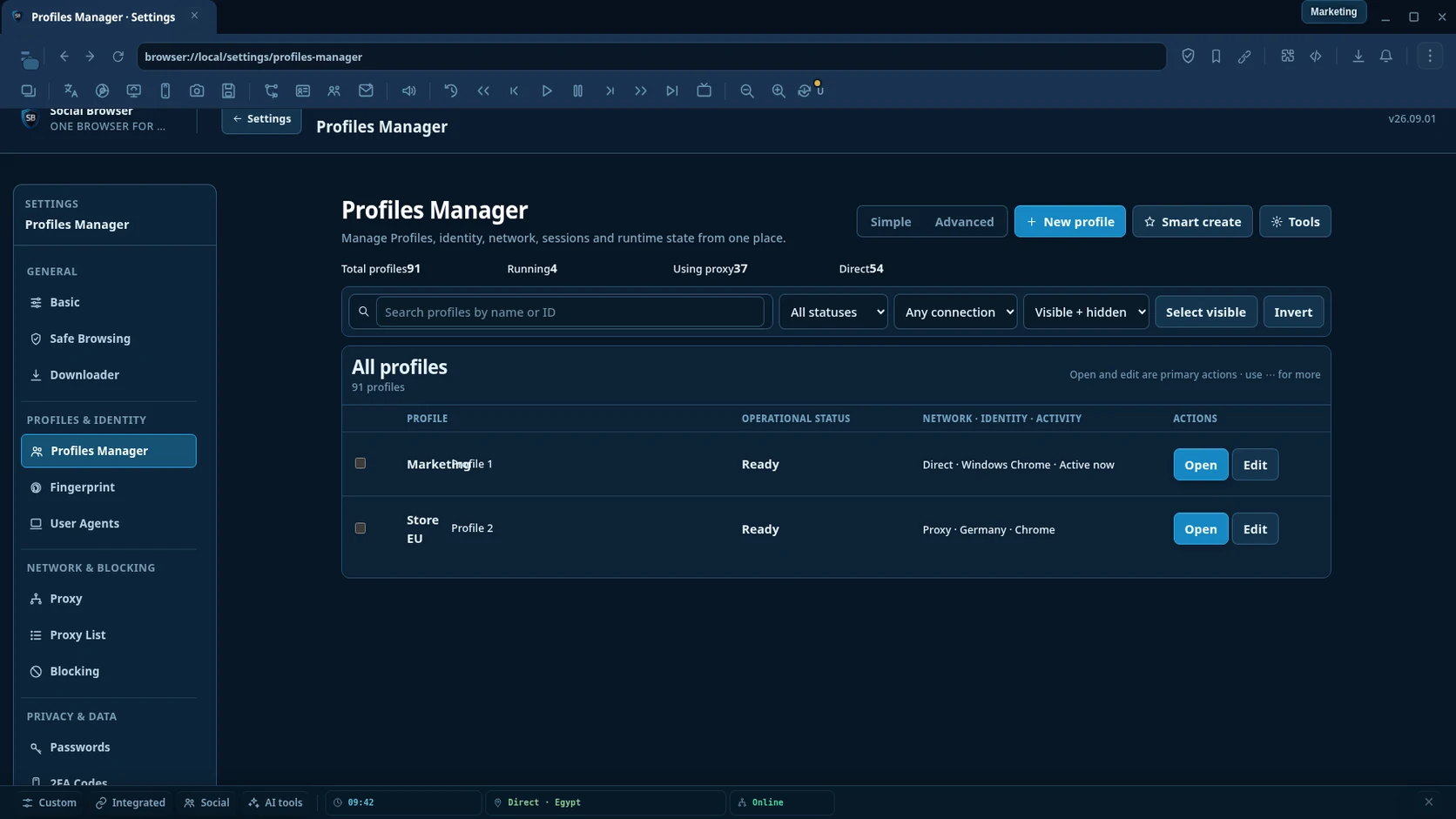
Один профиль сохраняет состояние браузера, необходимое вашему рабочему процессу.

Снова откройте профиль и вернитесь к его cookies, локальному хранилищу, настройкам браузера и дополнительной конфигурации прокси. Ручная работа и автоматизация могут использовать один и тот же контекст профиля.

  • Раздельные cookies, сессии, хранилище и настройки профиля
  • Пользовательская конфигурация прокси для каждого профиля
  • Постоянный авторизованный контекст браузера
  • Ручная и автоматизированная работа в одной среде

Основные возможности

Шесть направлений, упорядоченных по тому, что делает продукт полезным.

Базовые функции браузера остаются на месте. Ниже в первую очередь рассматриваются возможности, которые трудно заменить обычным профилем браузера.

100 бесплатных публичных прокси при первом запускеПри первом запуске новой установки Social Browser автоматически импортирует до 100 прокси из включённых публичных интернет-источников.
Получайте тысячи дополнительных прокси из публичных источниковProxy List может получать тысячи публичных прокси из редактируемых интернет-источников. Ваш тариф определяет, сколько прокси можно хранить одновременно.

01 · Постоянные профили

Сохраняйте состояние профиля раздельным и пригодным для повторного использования.

Каждый профиль браузера хранит собственные cookies, данные, состояние браузера, настройки и дополнительную пользовательскую конфигурацию прокси.

Изоляция профилейРаздельные cookies и локальное хранилище.

Build with AI is optional: Bring your own AI provider, keep Encrypted provider keys, review the draft, then save only when it is valid.

Постоянные сессииВернитесь позже к тому же состоянию профиля.
Прокси для каждого профиляПри необходимости настройте собственный прокси.
Управление профилямиИщите, организуйте, редактируйте и переключайте профили.

02 · Browser automation

Reliable automation without selector maintenance.

Build the Workflow, pick targets visually and let Social Browser handle normal page changes and failed runs with the fewest possible steps.

See Automation Reliability
  • Pick elementSelect a live page target instead of writing selectors by hand.
  • Login target recoveryOAuth and SSO can replace a tab; one clear replacement inside the same Profile is followed automatically.
  • Smart waitUse one simple wait instead of tuning load states and delays; clicks also wait for redirect chains to settle before the next step starts.
  • Reliable downloadsWait for the file to finish and treat a completed download as success.
  • Reliable uploadsSelect the upload area once; hidden file inputs, frames and upload verification are handled automatically.
  • Safe popup recoveryWhen a click opens one clear new tab or window, Social Browser can continue there only when the Workflow actually needs it.
  • Stuck detectionLong-running steps are surfaced clearly instead of silently appearing frozen.
  • Reactive form recoveryIf a React or Vue rerender replaces a field during Type or Fill, Social Browser re-attaches and preserves the intended value automatically.
  • Modern dropdownsThe same Select step works with native selects and common ARIA/React comboboxes, without rebuilding the action as Type + Click.
  • Automatic target recoveryWorking fallbacks are promoted when targets change; virtual lists are searched when the target has not rendered yet; reloaded iframes are recovered only when one unique frame contains the target; partly covered controls use a safe visible click point when possible.
  • One-click retryRetry failed work directly from Failure Center.
  • Advanced tools when neededAI Builder, MCP, webhooks, Cron, HTTP and data actions remain available without cluttering the basic flow.

03 · User Scripts и расширения

Настраивайте сайты и рабочие процессы браузера.

Используйте User Scripts и совместимые расширения браузера, когда рабочему процессу требуется настройка на уровне страницы или браузера.

  • User ScriptsЗапускайте скрипты на подходящих страницах.
  • Совместимость в стиле GMТиповые сценарии userscript, где они поддерживаются.
  • РасширенияИспользуйте совместимые расширения в стиле Chrome.
  • Инструменты разработчикаПроверяйте и отлаживайте рабочие процессы.

04 · Конфиденциальность и защита

Управляйте поддерживаемыми параметрами идентичности и просматривайте активность защиты.

Настройки конфиденциальности, блокировка и локальное хранение профилей описываются без общих антидетект-обещаний.

  • Настройки идентичностиПоддерживаемые свойства, сообщаемые браузером.
  • Движок блокировкиБлокировка рекламы, трекинга и вредоносных сайтов.
  • Телеметрия защитыПоказывайте фактическую активность заблокированных ресурсов.
  • Локальные данные прежде всегоДанные профиля по умолчанию остаются на устройстве.

05 · Продуктивность браузера

Держите повседневные инструменты браузера рядом с профилем.

Fast View, управление прокси, загрузки, закладки, уведомления, медиаконтроль и инструменты разработчика поддерживают повседневный рабочий процесс.

  • Fast ViewБыстрые панели верхнего уровня.
  • Менеджер проксиИмпортируйте, тестируйте, редактируйте и организуйте прокси.
  • Загрузки и закладкиОсновные утилиты браузера.
  • МедиаконтрольПомощники для аудио- и видеосценариев.

06 · Отдельные социальные инструменты

Добавляйте инструменты для конкретных платформ только при необходимости.

Free- и VIP-инструменты продуктивности для соцсетей отделены от подписки браузера, чтобы функции браузера и дополнительные инструменты оставались понятными и раздельными.

  • FacebookСценарии для страниц, групп, публикации и модерации.
  • YouTubeСценарии для авторов, видео и комментариев.
  • TikTokСценарии для видео, прямых эфиров и аккаунтов.
  • Instagram и XРабочие процессы продуктивности для публикаций и аккаунтов.

Complete product feature catalog

Every major public Social Browser feature has its own page.

Use this catalog to move from the browser feature name to a dedicated product page. Developer-only test, diagnostic and internal administration surfaces are intentionally not marketed as public product features.

Profiles & IdentityDedicated pageMultiple ProfilesPersistent isolated browser Profiles and reusable sessions.Open feature page →Automation & AIDedicated pageAutomation StudioWorkflow → Automation → Task with scheduling, targeting, retries and history.Open feature page →CustomizationDedicated pageUser ScriptsInstall and manage page-matched scripts with GM-style capabilities.Open feature page →AI & Browser ControlDedicated pageMCP + AIConnect compatible AI clients to search, read and control Social Browser with permissions.Open feature page →Privacy & IdentityDedicated pagePrivacy ControlsDocumented browser privacy and identity controls.Open feature page →Profiles & IdentityProfiles ManagerCreate, organize, edit and switch isolated browser Profiles from one place.Open feature page →Network & RoutingМенеджер проксиImport, test, edit and organize reusable proxies, then assign the right network configuration to Profiles.Open feature page →Privacy & IdentityBrowser Fingerprint & Identity ControlsControl supported browser identity surfaces per Profile while keeping each Profile stable until the user changes it.Open feature page →Profiles & IdentityUser Agents ManagerManage reusable User-Agent presets and choose the browser identity used by individual Profiles.Open feature page →Profiles & DataProfile User DataManage persistent browser state associated with Profiles, including stored session data used by daily workflows.Open feature page →Extensions & CustomizationExtensions ManagerUse and manage compatible Chrome-style extensions alongside Profiles, User Scripts and browser automation.Open feature page →Automation & DevelopmentJavaScript & Browser ControlUse built-in JavaScript capabilities for browser workflows, page control and developer-focused automation.Open feature page →Browser ProductivityDownload ManagerManage downloads across Social Browser Profiles with built-in and optional external downloader behavior.Open feature page →Browser ProductivityHistory ManagerInspect and manage stored browsing URLs while keeping browser activity organized around your workflow.Open feature page →Browser ProductivityBookmarks ManagerSave, edit and organize frequently used sites directly inside Social Browser.Open feature page →Privacy & ProtectionМеханизм блокировкиControl ad, popup, domain and browser blocking policies from a dedicated settings area.Open feature page →Security & ProtectionSafe BrowsingUse security lists and unsafe-content protections to reduce exposure to known harmful destinations.Open feature page →Privacy & DataPassword ManagerManage saved credentials inside Social Browser and keep login workflows close to the Profiles that use them.Open feature page →Privacy & Data2FA Code ManagerStore and manage one-time authentication entries used in account sign-in workflows.Open feature page →Privacy & UtilitiesTemporary EmailUse Social Browser temporary-email defaults and mailbox options as part of disposable email workflows.Open feature page →Privacy & DataPrivate Keys ManagerKeep private-key entries and related browser options in a dedicated management surface.Open feature page →Browser ProductivityKeyboard & CommandsCustomize shortcuts, search browser commands and build multi-step Command Chains.Open feature page →Browser ProductivityContext MenuConfigure integrated sites, social tools and context actions available from right-click workflows.Open feature page →Family SafetyKids Mode & Parent ControlsCreate supervised child Profiles with safer browsing policies, permissions and optional screen-time controls.Open feature page →РазработчикиBrowser API & Browser Automation SDKControl Social Browser through developer APIs, automation hooks and Chromium developer tooling.Open feature page →Browser ProductivityFast ViewOpen quick panels and profile-oriented controls above the active browser without leaving the current workflow.Open feature page →Daily Browser ToolsBrowser Productivity ToolsUse bookmarks, downloads, translation, screenshots, session handoff, zoom and other everyday browser controls around the same Profile workflow.Open feature page →Temporary Browser ContextsGhost WindowsOpen the current page in a temporary desktop or mobile browser context without changing the saved state of a normal persistent Profile.Open feature page →Browser ProductivityMedia & Page ToolsControl page audio and common video actions directly from the Social Browser toolbar while keeping everyday page utilities close at hand.Open feature page →Social ToolsDedicated pageFree & Social ToolsPlatform-specific productivity tools integrated with the Social Browser ecosystem.Open feature page →

Начните с браузера

Попробуйте реальный рабочий процесс до сравнения тарифов.

Начните с 10 профилей без регистрации.

MCP AI

Подключите свой ИИ напрямую к Social Browser.

Используйте постоянные Profiles, автоматизацию браузера, поиск и чтение веба, workflows, массовые операции, проверку и диагностику из MCP-совместимых ИИ-клиентов.