
Social Browser Guide
How Multi-Proxy Support Helps Organize Professional Browser Sessions
A responsible explanation of how multi-proxy support can help organize professional browser sessions and regional workflows.
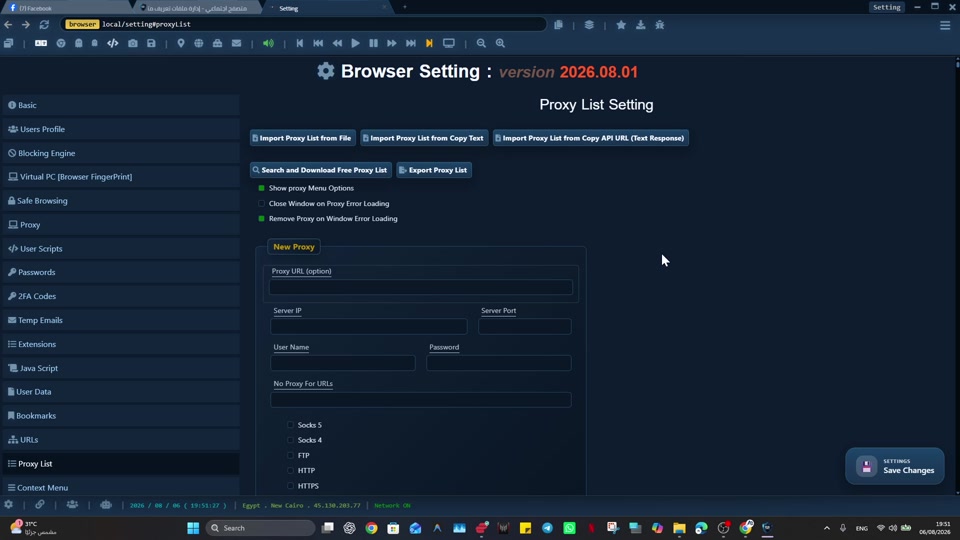
For professional operators, affiliate teams, agencies, testers, and regional workflow teams, organizing professional browser sessions with multi-proxy support can break down when network context is often switched manually and can become detached from the profile or workflow that needs it. A clearer browser context makes the work easier to review, repeat, and hand off.
The practical advantage is not another tab; it is a reusable Profile that keeps the relevant state together. For organizing professional browser sessions with multi-proxy support, Social Browser is useful because it lets teams associate network context with controlled profiles for clearer, policy-aware operations.
Multi-proxy organization principles
- Use dedicated profiles for every important account, campaign, role, or task.
- Keep session state, notes, and ownership close to the profile that needs them.
- Use browser automation and customization only where they have a clear purpose.
- Review profiles regularly so inactive, risky, or outdated work does not accumulate.
- Respect platform policies, privacy requirements, and local laws while improving productivity.
Multi-Proxy Sessions Compared With Standard Browsing
| Area | Standard browser pattern | Social Browser pattern | Professional value |
|---|---|---|---|
| Profiles | Personal or informal | Purpose-built work units | Clearer ownership |
| Sessions | Often mixed across tasks | Separated by profile and workflow | Lower operational confusion |
| Automation | External or scattered | Connected to profile context | More reliable execution |
| Customization | Extension-first and personal | Workflow-first and reviewable | Safer browser behavior |
| Team process | Depends on memory and messages | Documented team procedures | Better collaboration |
Example: map different work Profiles to the right network routes
Suppose a team has a support Profile, a QA testing Profile, and a documentation Profile. First decide which Profile genuinely needs a provider-supplied proxy, rather than assigning one only because the browser supports it. Verify each connection before expanding.
| Profile purpose | Network decision | Test before use |
|---|---|---|
| Support for an authorized account | Direct route unless a documented requirement calls for a proxy | Normal site navigation and expected account access |
| QA for a permitted regional scenario | One approved provider endpoint | Observed public IP, HTTPS loading, stable test session |
| Documentation and internal writing | Direct browsing unless otherwise needed | Working links and unchanged draft state |
Keep a simple record of Profile name, business purpose, selected route, last verification, and responsible owner. If a proxy stops working, pause that Profile's workflow and diagnose the failure instead of silently rerouting an authenticated session. A route change is not a permission change or a guarantee of anonymity.
For protocol-level background, consult MDN on proxy servers and tunneling. Social Browser provides configuration controls; external proxy endpoints come from the provider you select.
Practical Next Step
For “How Multi-Proxy Support Helps Organize Professional Browser Sessions”, start with a controlled first pass: assign one provider endpoint to one test Profile, verify connectivity and the public IP, then document which Profile owns that network context before broader use.
Important Limits and Safe Use
For “How Multi-Proxy Support Helps Organize Professional Browser Sessions”, the safe-use boundary is clear: a proxy changes network routing; it does not change account authorization or remove website policies. Social Browser provides proxy configuration, not a proxy service.
- Use endpoints from a provider you choose and trust.
- Protect proxy usernames, passwords, and provider credentials.
- Verify the actual route and public IP before account-sensitive work.
Expand “How Multi-Proxy Support Helps Organize Professional Browser Sessions” only after the expected result is repeatable, documented, and appropriate for the service being used.
Conclusion
The useful final test for “How Multi-Proxy Support Helps Organize Professional Browser Sessions” is whether the intended Profile consistently uses the verified network route.